



Running inventory for a small business feels manageable until that one Monday when your biggest customer needs 200 units and you're sitting at 47. The purchase order you placed three weeks ago? Still somewhere between "processing" and "maybe next week." Your backup supplier wants triple the price for rush delivery. Suddenly you're choosing between disappointing your best client or eating costs that destroy your margins.
This isn't about poor planning. It's about replenishment systems breaking down when lead times go from predictable to chaos. Most SMBs treat replenishment as a purchasing task when it's actually an operational system that touches every part of the business.
The hidden complexity of modern replenishment
Small business replenishment looks simple on paper. Track inventory, order when low, receive goods, repeat. But real operations face a completely different beast. Your main supplier's lead time jumps from 14 days to 31 because of port congestion. Your backup supplier suddenly requires minimum orders that blow past your cash flow limits. That seasonal product that sold 80 units last March? This year it moves 240.
Replenishment failures cascade through the entire operation. A stockout doesn't just mean lost sales. It means customer service scrambling to explain delays, operations reshuffling production schedules, finance reworking cash projections, and sales losing credibility with key accounts.
The typical small business response? Throw more safety stock at the problem. Except now you're sitting on $45,000 in slow-moving inventory while still hitting stockouts on your fastest movers. The real issue isn't inventory levels – it's that your replenishment system can't handle variability.
Building a system that actually works
Forget the enterprise-level complexity you see in supply chain textbooks. Small businesses need replenishment systems that work with 2-3 people wearing multiple hats, limited capital, and suppliers who change their minds about lead times weekly.
Never run out of stock or overorder again.
Listoly streamlines inventory workflows to keep your business stocked and profitable.
- Real-time stock tracking
- Automated reorder alerts
- Supplier and purchase management
No credit card required
The foundation starts with understanding that replenishment isn't a single process – it's three interconnected workflows that most SMBs accidentally merge into chaos:
Demand sensing happens daily through actual orders, not forecasts. Track your real consumption patterns, not what you think will sell. A clothing boutique tracking daily sales by SKU noticed their "slow" Tuesday sales actually drove 35% of certain categories. This granular view changed their entire ordering pattern.
Supply monitoring means knowing actual lead time performance, not promised dates. That supplier claiming 10-day delivery? Track their real performance. One electronics retailer discovered their "reliable" supplier averaged 17 days with 40% variance. Armed with data, they negotiated buffer agreements and adjusted reorder points accordingly.
Execution workflow connects sensing and monitoring to actual purchase decisions. This isn't about complex algorithms – it's about clear triggers and escalation paths that work when your inventory manager is also handling customer complaints and shipping issues.
Here's a simple visual of those three workflows.
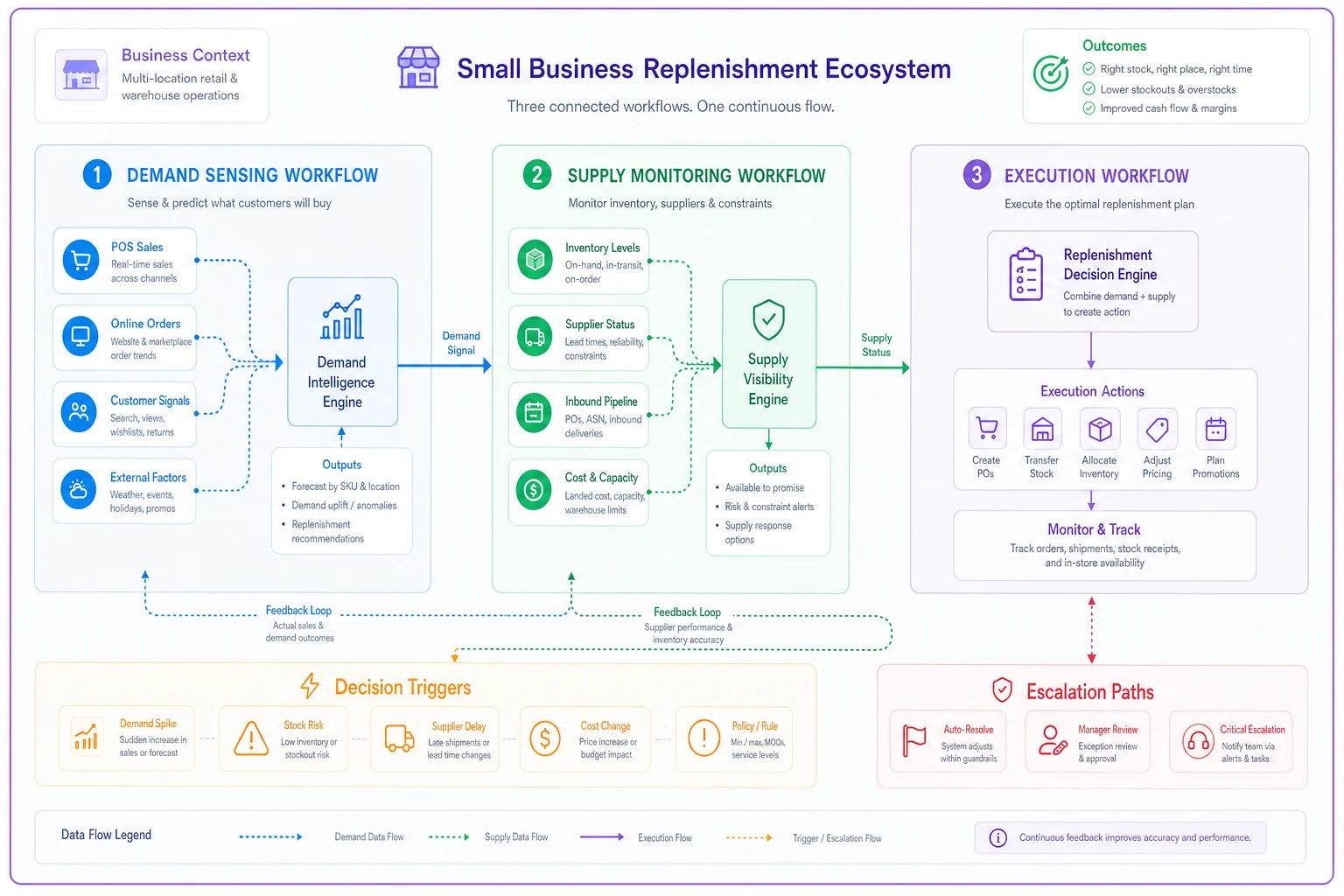
This isn't about complex algorithms – it's about clear triggers and escalation paths that work when your inventory manager is also handling customer complaints and shipping issues.
Role clarity when everyone does everything
Small teams can't have dedicated procurement specialists. But unclear responsibilities create replenishment chaos. The owner places emergency orders. The warehouse manager orders their favorites. The bookkeeper holds POs for cash flow. Nobody owns the system.
Clear role definition works even with limited people:
The Replenishment Owner (often ops manager or senior inventory person) owns the entire system health. They don't place every order, but they maintain reorder points, review lead time data, and catch system failures before they cascade. This takes maybe 4-6 hours weekly for most SMBs.
The Execution Role (warehouse lead, inventory coordinator) handles daily monitoring and standard PO creation. They follow the playbook, flag exceptions, but don't make strategic changes. Clear boundaries prevent freelancing that breaks the system.
The Escalation Authority (usually owner or GM) handles exceptions only. Supplier changes, emergency orders over $X, new product additions. They're not in daily operations but step in for decisions that affect cash flow or strategic relationships.
A distribution company with $3M revenue implemented this structure with just two people sharing all three roles. Clear handoffs and documented triggers meant their Tuesday/Thursday replenishment reviews took 90 minutes total versus the previous "constant crisis" mode.
SOP checkpoints that prevent disasters
Standard Operating Procedures for replenishment usually fail because they're either too complex (nobody follows them) or too simple (missing critical exceptions). The sweet spot: checkpoint-based SOPs that catch problems early without creating bureaucracy.
Weekly Checkpoint Structure
-
Monday Review (30 minutes)
- Scan weekend orders for demand spikes - Check any delayed PO statuses - Flag items hitting reorder points by Wednesday
-
Wednesday Execution (60-90 minutes)
- Generate standard POs for triggered items - Review lead time variances from last week's receipts - Submit POs before supplier cutoff times
-
Friday Verification (20 minutes)
- Confirm PO acknowledgments received - Update system with new promised dates - Flag any rejected or modified orders for Monday review
This rhythm works because it's frequent enough to catch issues but structured enough to batch decisions. One building supplies distributor cut their emergency orders by 70% just by implementing this Wednesday/Friday verification pattern.
Critical Exception Triggers
-
Any single order consuming >25% of available stock
-
Lead time extensions beyond 1.5x normal
-
Price increases over 15% from last PO
-
New customer requesting volumes outside normal patterns
These aren't just notifications – each trigger needs a specific escalation path and decision framework.
Monitoring lead time variance without complex systems
Enterprise systems track supplier performance with sophisticated analytics. Small businesses need something that works in a spreadsheet but still catches problems before they hit.
The simplest effective approach: Track Promised vs Actual for every PO, calculate running averages, and flag outliers. Sounds basic, but most SMBs don't even do this consistently.
| Supplier | Promised Days | 3-Month Actual Avg | Variance % | Current Status |
|---|---|---|---|---|
| Main Vendor | 14 | 18 | +29% | Degrading |
| Backup #1 | 21 | 19 | -10% | Stable |
| Backup #2 | 7 | 11 | +57% | Unreliable |
| Regional | 10 | 10 | 0% | Consistent |
This simple tracking revealed patterns no amount of supplier promises would surface. The "premium" fast supplier consistently missed dates. The "slow but steady" regional vendor never varied. Replenishment decisions immediately improved.
Use conditional formatting to highlight variance thresholds so issues jump out in a single glance.
-
Variance over 30%
Adjust reorder points immediately
-
Variance over 50%
Begin qualifying alternate suppliers
-
Variance trending worse for 3 periods
Escalate to renegotiate terms
A specialty foods distributor implemented this basic tracking and discovered their organic supplier's variance spiked every September-November due to harvest patterns. They now pre-order August inventory in June, eliminating their biggest seasonal stockout issue.
Escalation rules that keep operations moving
The worst replenishment failures happen when problems sit in limbo. The PO needs approval but the owner's traveling. The price increased but nobody has authority to accept. The lead time doubled but the standard process says wait.
Effective escalation isn't about hierarchy – it's about speed to decision.
Time-Based Escalation
-
Standard PO submission
2 hours max from trigger
-
If no response in 2 hours
Auto-approve if under $5,000
-
If no response in 4 hours
Backup approver activates
-
If no response in 8 hours
Standing instructions execute
This seems rigid but prevents the "waiting for approval" paralysis that kills small business replenishment. One wholesale operation reduced their average PO processing from 3 days to 4 hours just by implementing automatic escalation.
Situation-Based Triggers
-
Stockout imminent (less than 3 days coverage)
- Skip standard approval - Execute emergency PO up to $X - Notify within 2 hours of action taken
-
Price increase over threshold
- Accept up to 15% increase if stockout risk exists - Delay if coverage exceeds 30 days - Escalate anything over 25% regardless
-
Lead time extension
- Accept up to 10-day extension if coverage exists - Trigger backup supplier if extension exceeds coverage - Split order if partial shipment available
These aren't suggestions – they're pre-made decisions that execute automatically when conditions hit.
PO cadence templates for different business types
Not every business should order weekly. Not every supplier works with the same cadence. The trick is matching PO rhythms to your actual constraints: cash flow, storage space, supplier minimums, and demand patterns.
High-Velocity Retail (convenience stores, quick-service restaurants)
-
Primary suppliers
2-3 times weekly Secondary suppliers: Weekly Specialty items: Bi-weekly - Short shelf life drives frequency - Storage constraints limit order sizes - Multiple daily deliveries are normal
A convenience store chain of 3 locations moved from daily ordering chaos to this structured cadence. Result: 30% less time on ordering, 25% reduction in waste, better supplier pricing from consistent volumes.
Seasonal Businesses (landscaping supplies, holiday goods)
-
Peak season
Weekly majors, twice-weekly fast-movers Shoulder season: Bi-weekly standards Off-season: Monthly minimum maintenance - Cash flow preservation in slow periods - Aggressive availability during peak - Pre-positioning inventory before demand spikes
B2B Distribution (industrial supplies, wholesale)
-
A-items (top 20% of SKUs)
Weekly review, order at triggers B-items (next 30%): Bi-weekly review, monthly ordering C-items (bottom 50%): Monthly review, quarterly ordering - Focus resources on what matters - Reduce transaction costs on slow movers - Maintain service levels on critical items
Make-to-Stock Manufacturing (small batch production)
-
Raw materials
Monthly blanket POs with weekly releases Components: Aligned to production schedules (usually weekly) Packaging: Quarterly bulk orders with safety stock MRO supplies: Monthly automated replenishment
Your PO cadence should reduce decision fatigue while maintaining service levels. If you're making the same decisions daily, you need better templates. If you're constantly expediting, your cadence is too slow.
System integration without enterprise software
Most replenishment implementations fall apart here. The procedures look good on paper, but the actual workflow requires jumping between three spreadsheets, a purchasing system that doesn't talk to inventory, and email chains that nobody can track.
Small operations need integration that works with basic tools. Not enterprise resource planning behemoths, but simple connections that prevent data silos.
The minimum viable integration:
-
Inventory levels visible in the same place as PO history
-
Reorder points that automatically flag (even if just conditional formatting)
-
Supplier lead times tracked alongside order history
-
Single source of truth for what's ordered, what's coming, what's late
A hardware distributor built this entire system in Google Sheets with some basic formulas. Their "dashboard" was literally one tab showing items below reorder point, current POs in transit, and late shipments. Took two days to build, saved hours weekly.
The progression toward better tools happens naturally. Start with spreadsheets, add basic inventory software when volume justifies it, integrate purchasing when manual POs become the bottleneck. But don't wait for perfect tools to implement good processes.
This is where AI-powered operational software starts making sense for growing SMBs. Not as a replacement for your process, but as automation for the repetitive parts. AI agents can monitor your reorder points, flag variances, draft standard POs, and escalate exceptions while your team focuses on decisions that need human judgment. The playbook remains the same – the execution just gets faster and more consistent.
Common failure modes and recovery tactics
The Seasonal Surprise
Every year it's the same story. The seasonal spike "sneaks up" despite happening the exact same week for the past five years. Your replenishment system shows adequate coverage based on average demand, then boom – stockout city when orders triple overnight.
Recovery tactic: Build seasonal adjustment factors directly into your reorder points. If December sales are typically 2.5x November, your December 1st reorder points should reflect that. One gift retailer automated this with a simple multiplier table by month. Stockouts during peak season dropped 80%.
The Supplier Ghost
Your primary supplier goes dark. Orders aren't confirmed, emails aren't returned, phone calls go nowhere. But their system still shows "processing" so you wait. And wait. Then panic order from someone expensive.
Recovery tactic: Supplier silence triggers have strict timelines. No confirmation in 48 hours = automatic backup supplier activation. No shipment notification by promised date minus 2 days = expedite from alternate source. One food distributor implemented "supplier heartbeat" checks – if any supplier goes 72 hours without some communication, they're flagged as "at risk" and backup plans activate.
The Cash Flow Squeeze
Perfect replenishment plan meets reality: there's no money to execute it. The CFO puts all POs on hold, inventory dwindles, and soon you're choosing which customers to disappoint.
Recovery tactic: Build cash flow constraints into the replenishment system from the start. Tag items by margin contribution and customer criticality. When cash is tight, the system automatically prioritizes high-margin, high-impact items while delaying lower-priority orders. A building materials dealer created a simple "cash crunch protocol" that maintained service on their top 30 items even during tight periods.
What matters isn't avoiding these situations entirely – they happen to every business. What separates successful operations from chaotic ones is having documented recovery procedures that kick in automatically when things go wrong.
Technology as amplifier, not solution
The temptation with replenishment challenges is to immediately shop for software. New inventory system, demand planning tool, supplier portal, automated purchasing platform. Technology becomes the strategy.
But software can't fix broken processes. That expensive demand planning tool still needs clean data and consistent execution. The automated purchasing system still needs clear rules and escalation paths. Technology amplifies what you're already doing – good or bad.
Start with the manual version of your ideal process. Run it for at least one full cycle (usually 4-6 weeks) with basic tools. Document what works, what breaks, what takes too long. Then identify specific bottlenecks where automation would help.
Common bottlenecks worth automating:
-
Daily reorder point checking across hundreds of SKUs
-
PO creation for standard replenishment items
-
Lead time variance calculations and alerting
-
Supplier performance tracking and reporting
-
Exception flagging and escalation routing
The businesses that successfully scale their replenishment operations don't start with technology. They start with clear processes, defined roles, and measurable outcomes. Technology comes later to handle volume and reduce manual work, not to create the system itself.
Making it stick
Most replenishment playbooks fail not because they're wrong, but because they're abandoned after two weeks when things get busy. The daily chaos wins over systematic improvement.
Implementation approach that actually works starts small and builds credibility through quick wins. Pick your highest-volume, most problematic category. Implement the full playbook just for those 20-30 SKUs. Run it for a month. Measure the improvement. Then expand.
A parts distributor started with just their top 25 SKUs out of 1,200 total. After six weeks, stockouts on those items dropped to zero while carrying cost decreased 15%. That success bought them organizational buy-in to expand the program. Six months later, the entire inventory ran on the new playbook.
The other critical success factor: visible accountability. Post your key metrics where everyone sees them weekly:
-
Stockout incidents this week
-
Emergency PO count
-
Lead time variance alerts
-
On-time PO percentage
Not to shame anyone, but to make the system performance visible and important. When replenishment metrics are buried in reports nobody reads, the system slowly degrades back to chaos.
Building your own playbook
Every business needs its own version tailored to specific constraints and opportunities. But the structure remains consistent: clear roles, documented triggers, escalation paths, and measurement systems that catch problems early.
Start by documenting your current state, as messy as it might be. How do orders actually get placed today? Who makes those decisions? What information do they use? Where does it break? This baseline becomes your improvement roadmap.
Next, identify your biggest constraint. Is it cash flow? Supplier reliability? Demand variability? Storage space? Focus your initial playbook design on managing that primary constraint – everything else can stay simple for now.
Build your checkpoint cadence around your natural business rhythm. If Monday mornings are chaos, don't schedule replenishment reviews then. If your suppliers have Thursday afternoon cutoffs, work backward from there. The best playbook is one that fits your actual operation, not some theoretical ideal.
The most successful replenishment systems for SMBs aren't the most sophisticated – they're the most consistent. A simple playbook executed religiously beats a complex system that gets ignored when things get busy. Focus on building something sustainable that your resource-constrained team can actually maintain.
Small businesses don't need enterprise-level supply chain complexity. They need functional replenishment systems that prevent stockouts, manage cash flow, and don't require a full-time team to operate. Build that first, optimize later, and let technology amplify what's already working. The goal isn't perfection – it's predictability and continuous improvement within your actual constraints.
Ready to optimize your inventory operations?
Join 2,000+ businesses using Listoly to reduce stockouts, save time, and improve order accuracy.