



Most small warehouse operations discover they need lot traceability the hard way—during an audit, after a recall notice, or when a customer calls about an allergic reaction. The scramble that follows usually involves printing hundreds of pages, manually cross-referencing packing slips, and praying your receiving team actually wrote down those batch numbers three months ago.
Building lot traceability for small warehouses isn't about installing enterprise software or hiring compliance consultants. It's about creating workflows your existing team can actually follow, using tools you already have, and building documentation that satisfies auditors without grinding your operation to a halt.
The operational breakdown: where lot tracking actually fails
Lot traceability breaks down at predictable points in small warehouse operations. The receiving dock is ground zero—this is where someone unloading a truck at 6 AM decides whether to write "Batch 24-087B" or just "Thursday delivery" on the intake form. One warehouse I worked with found their receiver had been writing "see box" for six months straight. The boxes, naturally, had been recycled.
The second failure point happens during put-away. Even when receiving captures lot numbers correctly, the information gets lost between the dock and the shelf. You might have beautiful receiving logs showing every batch number, but if nobody records which shelf location got which lot, those logs become expensive fiction. A food distributor handling specialty imports learned this after spending 72 hours manually checking every case in their facility during an allergen recall—they had perfect receiving records and zero location mapping.
Pick-and-pack creates the third breakdown. Orders get fulfilled, products ship, but the connection between customer orders and specific lot numbers disappears. During recalls, that gap becomes catastrophic. One supplement warehouse ended up calling roughly 400 customers individually because they couldn't trace which lots went to which orders.
The systematic failure happens when these individual breakdowns stack. Missing data at receiving makes location tracking impossible. Poor location tracking makes accurate picking harder. Inaccurate picking records make recalls a nightmare. Each gap compounds the next.
Building lot-tagging standards that survive real operations
The most sophisticated lot-tracking system fails if your team can't execute it during a busy Tuesday afternoon. Small warehouses need standards simple enough for temp workers but detailed enough for FDA auditors.
Never run out of stock or overorder again.
Listoly streamlines inventory workflows to keep your business stocked and profitable.
- Real-time stock tracking
- Automated reorder alerts
- Supplier and purchase management
No credit card required
Start with a three-part lot identifier that humans can actually write correctly:
YYMMDD-SUPPLIER-SEQUENCE January 15th, 2024's second delivery from vendor ABC becomes: 240115-ABC-02 This format works because it sorts chronologically in spreadsheets, identifies the source immediately, and handles multiple daily deliveries. More importantly, it's short enough to handwrite on labels and simple enough to explain in five minutes.
-
Primary label on the case (printed if possible, handwritten if necessary)
-
Secondary marking directly on the product packaging with permanent marker
-
Photo documentation of the pallet with lot numbers visible
-
Entry in the receiving log with location assignment
For products requiring temperature control or expiration tracking, add a colored dot system:
-
Red dots for items expiring within 30 days
-
Yellow dots for 31-60 days
-
Green dots for 60+ days
This visual system lets pickers identify short-dated inventory without checking dates on every item. One produce distributor cut expired waste by around 40% just from the colored dots—pickers naturally grabbed red-dot items first without needing reminders.
The critical addition for small warehouses: lot cards that travel with the product. These are half-sheet papers that move from receiving to shelf to picking station, accumulating stamps or initials at each step. When auditors show up, these cards provide a physical audit trail proving your process actually happens, not just exists on paper.
Keep a small stack of pre-filled lot cards at the receiving desk so receivers don't need to write from scratch during busy arrivals.
When auditors show up, these cards provide a physical audit trail proving your process actually happens, not just exists on paper.
Short-dated prioritization without complex systems
FIFO sounds simple until you're managing 200 SKUs across multiple lots with varying expiration dates. Small warehouses need prioritization rules that work without warehouse management software.
A zone system works better than pure FIFO for most small operations. Designate specific shelf sections for different date ranges:
Zone A (Front/Easy Access): Products expiring in 0-30 days Zone B (Middle): Products expiring in 31-90 days Zone C (Back/Bulk): Products expiring in 90+ days
As products age, they physically move forward. This creates natural prioritization—pickers always pull from Zone A because it's the most accessible. The physical movement also doubles as a visual inventory check. Zone A overflowing means too much short-dated product. Zone A empty means it's worth checking your receiving dates.
For operations handling both dated and non-dated products, put a "use-first" cage near the packing station. Every morning, the inventory team moves that day's must-ship products into this cage. Pickers clear it before touching regular inventory. The physical constraint does the work so you don't have to manage it verbally every day.
The override protocol matters as much as the standard process. Sometimes customers request fresh dates, or you're holding short-dated product for a scheduled large order. Document these in a simple override log:
| Date | Product | Lot # | Expiry | Override Reason | Approved By |
|---|---|---|---|---|---|
| 3/15 | Protein Powder | 240201-VP-01 | 4/1 | Customer requested 6+ month date | JS |
| 3/16 | Vitamin C | 240115-NW-03 | 3/30 | Holding for school district order 3/20 | MK |
This log proves you have controls around exceptions and, over time, surfaces patterns that might indicate deeper process problems.
Recall execution: the 4-hour response window
When a recall notice arrives, small warehouses have roughly four hours to demonstrate control before regulators and customers start escalating. The difference between a manageable recall and a crisis comes down to having executable steps, not perfect systems.
Hour 1: Containment The first move isn't investigation—it's isolation. Before you know exactly what's affected, you stop it from leaving. Lock down all potentially suspect inventory by placing physical "HOLD" tags on suspect products, emailing all pickers and packers with the stop-ship notice, disabling the SKU in your order system if possible, and posting physical notices at every packing station.
A medical supply warehouse avoided shipping 200 contaminated units by having laminated "STOP" cards ready to post within minutes of their recall notice. They'd drilled the procedure quarterly, so when the real recall hit, containment took eight minutes.
Hour 2: Identification Now you trace affected lots:
-
Pull receiving logs for the affected date ranges
-
Check lot cards and location logs for current inventory
-
Review shipping records to identify distributed product
-
Cross-reference override logs for any exceptions
This is where the three-part lot numbering pays off. Filtering spreadsheets by date range and supplier code immediately surfaces affected inventory without manual searching.
Hour 3: Quantification Auditors and regulators want specific numbers. Build this report in a standard format:
| Lot Number | Received | On-Hand | Shipped | In-Transit | Destroyed | Accounted |
|---|---|---|---|---|---|---|
| 240115-ABC-01 | 500 | 127 | 350 | 18 | 5 | 500 |
| 240115-ABC-02 | 500 | 89 | 400 | 11 | 0 | 500 |
The "Accounted" column proves your math—every unit received should equal the sum of on-hand, shipped, in-transit, and destroyed. Regulators want to see that number close cleanly.
Hour 4: Communication Draft three communications:
-
Customer notification listing specific order numbers and lot numbers
-
Regulatory response with your quantification report and containment confirmation
-
Internal summary documenting actions taken and identifying process gaps
The customer notification needs to be specific enough to be useful but not so detailed it creates confusion. Include order number and date, specific lot numbers shipped, a clear action requested (return, destroy, hold), and a direct contact for questions.
Here's a quick workflow image of the 4-hour recall response.
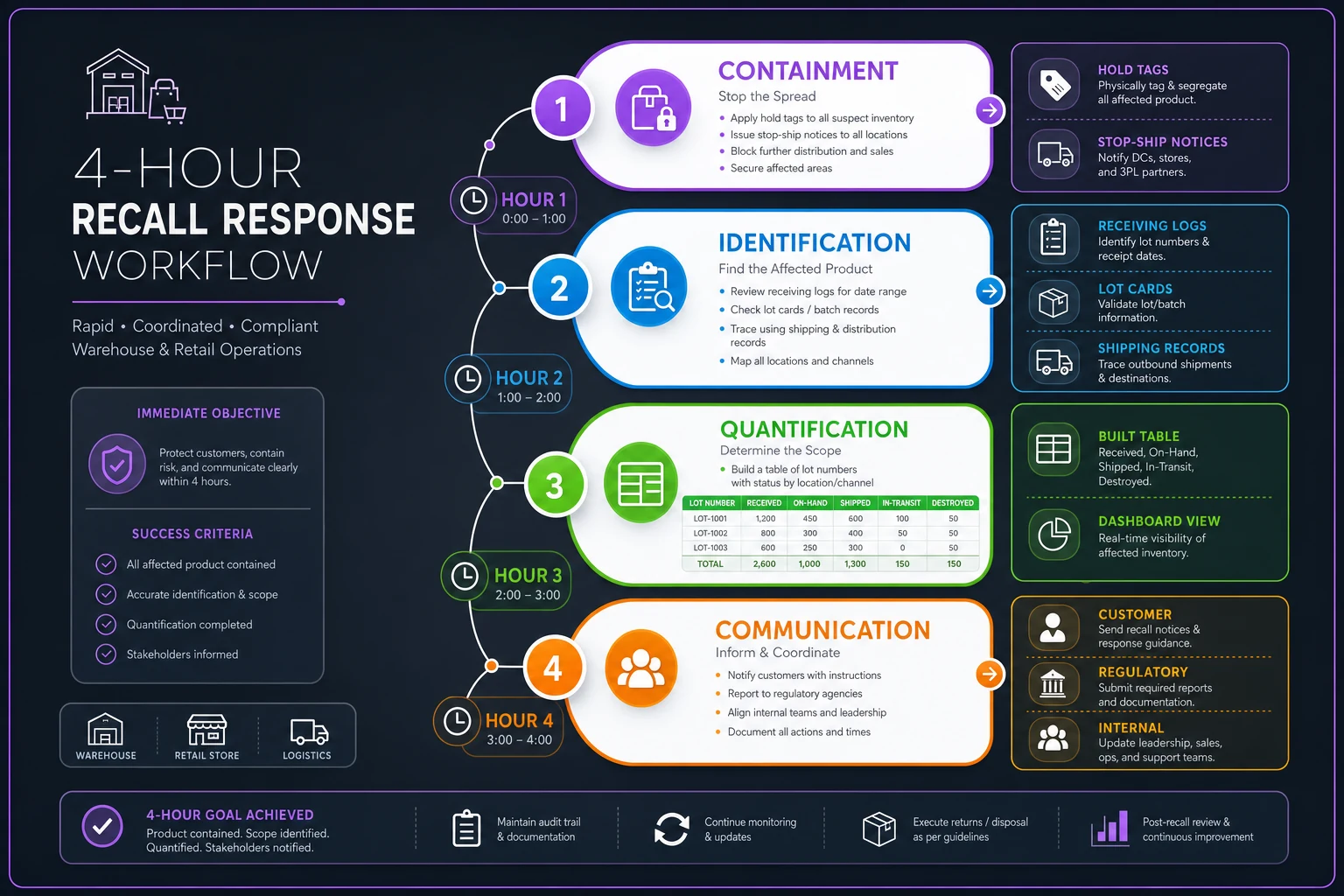
Use this as a visual checklist when you run drills so everyone knows their role in each hour.
The audit-ready export package
Auditors don't care about your sophisticated systems—they care about evidence that those systems actually work. Small warehouses need specific exports that prove compliance without requiring custom database queries.
The standard audit package includes five core documents:
1. Lot Receiving Log A chronological record showing every lot received, inspector initials, and initial location placement. Export as CSV with columns for: Date Received, Lot Number, SKU, Quantity, Inspector, Location Assigned, Temperature (if applicable).
2. Location History Report This proves you can track where specific lots have been stored. For each lot: Original Location, Move Date, New Location, Reason for Move, Moved By. Even with paper records, digitize this monthly into a spreadsheet.
3. Distribution Trace The report linking customer orders to specific lots. Format: Order Number, Customer, Ship Date, SKU, Lot Number, Quantity, Carrier, Tracking. This is what you'll need within minutes during a recall.
4. Destruction/Return Log Document any product that didn't ship to customers: Date, Lot Number, Quantity, Reason (expired/damaged/recalled), Method (returned to vendor/destroyed), Witnessed By, Documentation (photos/certificates).
5. Temperature/Storage Condition Logs If handling temperature-sensitive products: Date/Time, Location, Temperature, Recorded By, Out-of-Range Incidents, Corrective Actions.
/2024Q1LotTrace/ /Receiving/ receivinglogjan.csv receivinglogfeb.csv receivinglogmar.csv /Distribution/ shipmentsjan.csv shipmentsfeb.csv shipmentsmar.csv /Destruction/ destructionlogQ1.csv /Temperature/ templogsQ1.pdf /OverrideExceptions/ overridelog_Q1.csv
Keep three months of data immediately accessible, twelve months archived but retrievable within 24 hours. Auditors typically request 30-90 days of records, but recalls can require tracing back six months or more.
Tools and checklists: building compliance with what you have
Small warehouses can achieve effective lot traceability using basic tools—the key is consistency, not sophistication.
Physical Tools:
-
Pre-printed lot label sheets (or a label maker)
-
Colored dot stickers for date identification
-
Lot cards (cardstock, not paper—they need to survive warehouse handling)
-
"HOLD" and "QUARANTINE" signs (laminated)
-
Permanent markers that actually stay permanent
-
A dedicated camera or phone for documentation
Digital Tools:
-
Google Sheets or Excel for lot tracking (with cloud backup)
-
A shared folder for documentation photos
-
Email groups for rapid recall communication
-
PDF scanner for digitizing paper records
The Daily Checklist:
-
Morning (10 minutes)
- [ ] Check Zone A for products needing immediate movement - [ ] Move aged products from Zone B to Zone A as needed - [ ] Verify yesterday's receiving logs were entered digitally - [ ] Clear any products in quarantine that have been resolved
-
Receiving (per shipment)
- [ ] Assign lot numbers using standard format - [ ] Apply primary and secondary labels - [ ] Take documentation photo - [ ] Complete lot card - [ ] Enter in digital receiving log - [ ] Assign specific location - [ ] Apply date-based colored dots
-
End of Day (15 minutes)
- [ ] Verify all lot cards were filed - [ ] Confirm digital logs match physical receipts - [ ] Upload any documentation photos - [ ] Flag any products approaching expiration - [ ] Update override log for any exceptions
-
The Weekly Audit (30 minutes)
- [ ] Export the week's receiving and shipping logs - [ ] Spot-check 5 random lots for accurate location - [ ] Review override log for patterns - [ ] Test-trace one random shipment from last week - [ ] Archive the previous week's records
This schedule seems tedious until you face your first real recall. The distributor who spent 30 minutes daily on lot tracking saved 40+ hours during their FDA inspection—and passed without violations.
Common pitfalls in small warehouse lot tracking
The most dangerous assumption in lot traceability is that everyone understands why accuracy matters. Your receiving team might not realize that writing "morning delivery" instead of an actual lot number could contribute to a nationwide recall. Training needs to connect daily tasks to real consequences, not just compliance checkboxes.
The second major pitfall is treating lot tracking as a compliance exercise rather than an operational tool. Proper inventory tracking helps identify mismatches between different systems, and lot tracking adds another layer—you can identify not just what's missing, but exactly which batch disappeared. That granularity helps surface theft, damage patterns, and supplier quality issues before they compound.
Seasonal volume breaks most lot-tracking systems. The standards that work when you're receiving 20 cases daily fall apart when holiday season brings 200. Build surge protocols before you need them:
-
Pre-print extra lot labels during slow periods
-
Train backup receivers before busy season
-
Simplify the lot format during peak times (skip sequence numbers if there's only one delivery per day)
-
Schedule daily catch-up sessions to digitize paper records
The technology trap catches growing warehouses repeatedly. As volume increases, the temptation grows to implement a warehouse management system. But if your team hasn't mastered paper-based lot tracking, software won't fix the underlying process problems. One food distributor spent around $50K on WMS software, only to find their team was still entering "see box" in the system fields.
When operational software actually helps
Manual lot tracking works until it doesn't—usually somewhere around 50-100 SKUs with multiple active lots each. At that scale, spreadsheets get unwieldy, lot cards get lost, and the daily time commitment grows from 45 minutes to several hours.
This is where AI-powered operational platforms can genuinely improve lot traceability without requiring enterprise-level investment. Modern systems can automatically parse lot numbers from label photos, flag approaching expiration dates, and generate recall reports in minutes instead of hours. The AI components handle the tedious pattern matching—recognizing that "24-087B" and "24087B" are probably the same lot—while your team stays focused on physical product movement.
The real value isn't in tracking itself but in the connections. When your lot tracking talks to order management, you can instantly pull every customer who received a specific batch. When it connects to receiving, you can trace quality issues back to specific suppliers. When it monitors expiration dates automatically, you can move products proactively before they become waste.
A specialty food warehouse running 300+ SKUs cut their recall response time from around six hours to under 25 minutes after implementing automated lot tracking. But the bigger operational win was discovering that roughly 15% of their expired waste came from just three suppliers with inconsistent date labeling. Fixing that supplier issue saved more than the software cost in the first quarter.
The key is choosing software that enhances your existing workflows rather than replacing them. If your team is comfortable with the three-part lot numbering system, the software should support it. If you've built good habits around lot cards and colored dots, the system should digitize those tools, not eliminate them.
Making lot traceability sustainable
The best lot-tracking system is one your team actually uses when nobody's watching. The warehouses that succeed share a few things in common: they keep it simple, they build habits before adding technology, and they treat lot tracking as useful operational data rather than compliance paperwork.
Start with the basics. Run the three-part lot numbering system for a full month before adding complexity. Get receiving and put-away tracking solid before worrying about picking protocols. Build the daily habits that create consistent data. Once that foundation is stable, you can layer on temperature tracking, supplier scorecards, or predictive expiration management without overwhelming your team.
More importantly, connect lot tracking to business value beyond passing audits. When you can trace a quality complaint to a specific supplier batch, you have real leverage in negotiations. When you can prove your cold chain held during an inspection, you might qualify for better insurance rates. When you can execute a surgical recall affecting 50 units instead of 5,000, you protect customer relationships and avoid write-offs that hurt.
Small warehouse lot traceability doesn't require massive investment or complicated systems. It requires consistent processes, clear standards, and tools matched to your actual operation. Whether you're tracking 50 lots with paper cards or 5,000 with operational software, the principles don't change: capture data at receiving, maintain it through storage, connect it to distribution, and keep it accessible for when—not if—you need it.
The warehouses that handle recalls smoothly aren't the ones with the best technology. They're the ones where lot tracking is woven into daily operations, where every team member understands their role, and where the system works on the busiest day, not just the quiet ones.
Small warehouse lot traceability doesn't require massive investment or complicated systems. It requires consistent processes, clear standards, and tools matched to your actual operation. Whether you're tracking 50 lots with paper cards or 5,000 with operational software, the principles don't change: capture data at receiving, maintain it through storage, connect it to distribution, and keep it accessible for when—not if—you need it.
The warehouses that handle recalls smoothly aren't the ones with the best technology. They're the ones where lot tracking is woven into daily operations, where every team member understands their role, and where the system works on the busiest day, not just the quiet ones.
Ready to optimize your inventory operations?
Join 2,000+ businesses using Listoly to reduce stockouts, save time, and improve order accuracy.