


Most inventory tools get bought in a panic. A store oversells a popular item across three channels during a weekend sale, or a warehouse spends two days counting shelves just to close out the month, and suddenly "we need software" turns into "we need software by Friday." That rush is exactly how businesses end up paying for an enterprise WMS they'll never fully use, or a free tool that chokes once they hit a couple thousand SKUs.
This guide skips the hype. It's a short, opinionated list of cloud inventory platforms that actually fit small warehouses and retail stores — the kind running one to three locations, somewhere between 500 and 15,000 SKUs, with a team that doesn't have an IT department. The focus is real-time stock accuracy, setup you can finish in days rather than months, and monthly pricing that won't make you wince.
You'll get a one-page comparison, a feature checklist you can hold vendors to, scenario-based picks, and a migration quick-start that keeps you from importing a mess into your shiny new system.
What "good" actually looks like at this size
Before the list, it helps to understand what separates a tool that works for a 10-person operation from one that just looks good in a demo.
The demos always show the dashboard. The dashboard is never the problem. The problem is the boring plumbing underneath: does stock actually decrement the instant a sale happens on Shopify, or does it batch-sync every 15 minutes and let two customers buy the last unit? Can a part-time receiver scan inbound stock on a cheap Android phone, or do they need a $900 dedicated scanner? When you add a new user, can you give them "count and receive" permissions without handing them access to delete products?
Those three things — real-time sync, mobile scanning on commodity hardware, and sane user roles — are where cheap tools quietly fall apart. Everything else is negotiable.
A quick reality check on pricing, because this is where expectations go sideways:
-
Entry tier roughly $0–$80/month. Fine for a single location and modest SKU counts. Sync is often slower, integrations thinner.
-
Core tier roughly $100–$300/month. Where most small warehouses and multi-channel retailers land. Real-time sync, barcode workflows, decent integration coverage.
-
Growth tier roughly $300–$700/month. Multi-location, more users, advanced purchasing and reporting.
Anyone quoting you four figures a month for a two-location shop is selling you headroom you don't need yet.
The short list: one-page comparison
Seven platforms, each with a clear "who it's for." I'm deliberately not calling any one of them "the best," because the best tool for a boutique with a POS and a stockroom is a bad tool for a 3PL-lite fulfillment operation.
Never run out of stock or overorder again.
Listoly streamlines inventory workflows to keep your business stocked and profitable.
- Real-time stock tracking
- Automated reorder alerts
- Supplier and purchase management
No credit card required
| Platform | Best for | Core strength | Expected monthly band |
|---|---|---|---|
| Square for Retail | Brick-and-mortar stores already on Square POS | Dead-simple setup, POS and inventory in one | $0–$90 |
| Lightspeed Retail | Multi-location retail with real purchasing needs | Strong POS + purchase order and vendor tools | $100–$300 |
| Zoho Inventory | Budget-conscious omnichannel sellers | Cheap, surprisingly deep integrations | $0–$250 |
| inFlow Inventory | Small warehouses / light fulfillment | Barcode-first workflows, clean warehouse UX | $90–$350 |
| Cin7 Core (formerly DEAR) | Growing omnichannel + light manufacturing | Deep features, strong channel + accounting sync | $300–$600 |
| Sortly | Very small teams, asset/stock tracking, visual catalogs | Photo-based, ridiculously fast to start | $0–$150 |
| Ordoro | Sellers who ship a lot across channels | Shipping + inventory in one, carrier rate shopping | $0–$350 |
A few honest notes. Square is almost unfair to list next to the others because it's so easy — but it hits a ceiling fast if you do real warehousing. Cin7 Core is the most powerful here and the most likely to overwhelm a small team during setup. Sortly wins on speed-to-start but is lighter on ecommerce sync than the rest. The right pick is whichever one matches how your orders actually flow.
The feature checklist to hold vendors to
Run through this during the free trial — not the sales demo. The trial is where the gaps show up.
-
Real-time (not batched) sync across every channel you sell on. Ask directly: "Is this real-time or interval-based?" Make them give you a number.
-
Mobile barcode scanning on standard phones. Confirm it works with the phone camera, not just paid hardware.
-
Simple user roles. You should be able to set up a "warehouse staff" role in under a minute without building a permissions spreadsheet.
-
Low setup steps. Count the clicks to add your first product, receive stock, and make a sale. Painful for one SKU means agony for 3,000.
-
POS integration if you have a storefront — and verify stock moves in both directions.
-
Ecommerce integration (Shopify, WooCommerce, Amazon, eBay, etc.) with per-channel stock buffers.
-
Shipping integration so fulfillment decrements inventory automatically instead of someone updating it by hand.
-
Bulk import/export via CSV. You'll need this on day one and every audit after.
-
Low-stock and reorder alerts that you can set per SKU, not just a single global threshold.
-
An audit trail — who changed what quantity, when. This single feature pays for itself the first time the numbers don't reconcile.
One pattern worth flagging: tools that treat barcode scanning as an afterthought almost always make receiving painful too. If scanning feels bolted-on during the trial, assume your inbound process will fight you for as long as you're on that platform.
Picking by scenario
Brick-and-mortar retail (one to a few storefronts)
If most of your sales ring up at a register and your "warehouse" is a stockroom plus a back shelf, you want POS-first software. Square for Retail if you're small and want zero friction; Lightspeed Retail once you're managing multiple locations, real vendor purchase orders, and want better reporting.
Light warehousing and fulfillment
Here the center of gravity shifts from the register to the receiving dock and pick area. You care about scanning inbound stock fast, picking accurately, and keeping counts tight across more SKUs. inFlow is the sweet spot for most — genuinely barcode-first, clean on a phone, affordable. Ordoro earns its place if shipping volume is high enough that carrier rate-shopping and batch label printing save real money.
A typical situation looks like this: a small fulfillment operation moving 40–60 outbound orders a day, previously tracking stock in a shared spreadsheet, steadily drifting 3–5% off on fast movers because sales and receiving updated the sheet at different times. Moving to a scan-on-receive, scan-on-pick workflow didn't just fix the number — it removed the daily argument about whose count was right.
Omnichannel sellers
Selling on a website plus two or three marketplaces is where oversells live. One shared pool of stock, multiple channels pulling from it, and any sync lag turns into cancelled orders and marketplace penalties. Zoho Inventory is the budget-friendly entry point; Cin7 Core is the step up once your catalog, channel count, and accounting sync demands get serious.
The non-obvious thing with omnichannel: the software matters less than your buffer discipline. Even solid real-time sync can't beat physics when two orders land in the same second. Keep a small per-channel safety buffer on your tightest-stock items and you'll prevent most oversells before the software ever has to catch them.
When each setup is a bad idea
A guide that only tells you what to buy is half a guide.
Some situations where the "obvious" choice is wrong:
-
Don't buy Square's inventory module if you're doing real multi-bin warehousing. It's not built for it, and you'll outgrow it mid-migration.
-
Don't buy Cin7 Core if you have one location, a few hundred SKUs, and a two-person team. It's a lot of platform. Setup alone can eat weeks you don't have.
-
Don't force a warehouse-first tool into a pure retail store. The extra receiving and location steps slow down counter staff for no real payoff.
-
Don't pick a free tier because it's free if it batches sync. The savings evaporate after the first oversold weekend.
Don't pick a free tier because it's free if it batches sync. The savings evaporate after the first oversold weekend.
A 4-step selection checklist
Keep this tight.
You don't need a six-week evaluation process for a $200/month tool.
-
Map your order flow on one page. Where do sales originate? Where does stock physically live? What has to stay in sync? This single diagram eliminates half the list immediately.
-
Shortlist two or three tools from the scenario that matches your flow — not all seven.
-
Run a real trial with real data. Import 50–100 of your actual SKUs, do a full loop: receive, sell on each channel, ship, check the counts. Watch where numbers drift.
-
Score on friction, not features. The tool your staff will actually use beats the one with the longer feature list every time.
The tool your staff will actually use beats the one with the longer feature list every time.
Implementation and migration quick-start
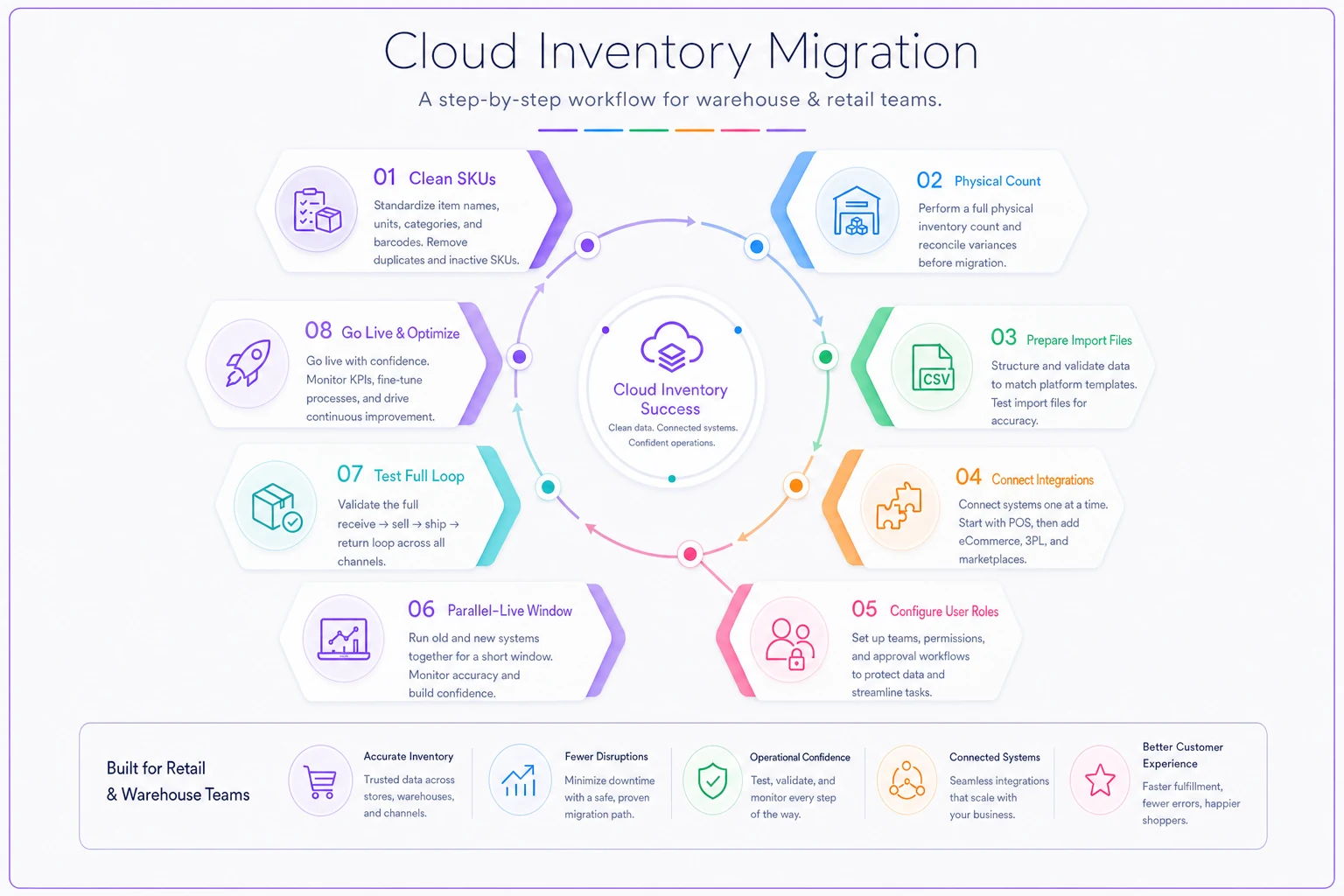
This is where most rollouts quietly fail. The software is rarely the problem — the data you pour into it is. Work through these in order before you flip the switch.
Clean your SKU list first.
-
Clean your SKU list first. Kill duplicates, standardize naming, and decide your SKU format before import. Garbage in means garbage reports forever.
-
Do a physical count of everything you're migrating. Don't trust old numbers. Your opening balance in the new system is your foundation — get it honest.
-
Prep your import files to match the platform's template exactly. Mismatched columns and smart-quotes in CSVs cause more migration pain than anything else.
-
Set up integrations one at a time. Connect POS first, verify stock moves correctly, then add the next channel. Connecting everything at once makes it hard to figure out which integration is causing the weird numbers.
-
Configure user roles before go-live, not after someone deletes something they shouldn't have.
-
Decide how returns and quarantined stock get handled in the new system before you launch — where damaged or inspection-pending units sit so they don't accidentally get re-sold. If you don't already have a clean process for this, the low-overhead quarantine and returns workflow is worth setting up alongside the migration so your counts stay trustworthy from day one.
-
Run parallel for a short window. Keep your old method alive for a week or two while you confirm new counts match reality.
-
Test the full loop before trusting it. Receive one PO, sell across every channel, process a return, ship an order, and reconcile. If the numbers hold, you're ready.
Here's a compact visual of the migration workflow.
Teams that skip pre-import SKU cleanup almost always end up re-importing. One retailer tried to migrate "as-is" to save time, discovered 400+ duplicate and malformed SKUs mid-rollout, and spent longer untangling it inside the new system than a clean prep would have taken. Cleanup first is slower on paper and faster in practice.
Cost-saving tips that don't cost you accuracy
Pay annually once you've committed.
-
Pay annually once you've committed. Most of these platforms offer 10–20% off for yearly billing. Don't prepay during a trial — commit first.
-
Count your users honestly. Per-seat pricing adds up. A shared "warehouse" login for scanning tasks (where the tool allows it) can save seats, as long as your audit trail still identifies who did what.
-
Don't over-buy tiers for features you'll "eventually" use. Upgrade when a real need shows up. Vendors make upgrading easy — that's never where you get stuck.
-
Use native integrations before paid connectors. Third-party sync middleware is sometimes necessary, but it's an extra monthly line item and an extra point of failure. Exhaust the built-in options first.
-
Right-size your scanning hardware. If the software works on phones, start with phones. Buy dedicated scanners only when volume clearly justifies it.
Right-size your scanning hardware. If the software works on phones, start with phones. Buy dedicated scanners only when volume clearly justifies it.
A quick real scenario
A small home-goods shop running a storefront plus a Shopify store and an Etsy shop kept hitting the same wall: a candle line would sell out online faster than the shared spreadsheet could update, and they'd cancel two or three orders a week — plus the occasional Etsy penalty for it.
They moved to a core-tier cloud inventory tool with real-time sync and set a small per-channel buffer on their 30 fastest movers. The oversells didn't vanish entirely overnight, but within the first month cancellations dropped to maybe one every couple of weeks, and the stockroom stopped doing a full manual recount every Sunday. Monthly cost landed around $160. Against the saved weekend hours and recovered sales, it paid for itself quickly — and more importantly, the team stopped arguing about which number was correct.
FAQ
How long does setup actually take? For a POS-first tool like Square, a single store can be live in an afternoon. For a warehouse-oriented tool with a few thousand SKUs and multiple integrations, plan on one to two weeks — including a clean SKU prep and a short parallel-run period. The variable is almost always data cleanliness, not the software itself.
Is "real-time" sync really different from syncing every few minutes? Yes, and it matters most for omnichannel. A 10–15 minute batch window is plenty of time for two customers on two channels to both buy your last unit. If you sell the same stock in multiple places, insist on real-time and keep a small safety buffer on your tightest items.
Can I run barcode scanning without buying expensive hardware? On most tools listed here, yes — the phone camera works for scanning. Dedicated scanners become worthwhile when your receiving or pick volume is high enough that camera speed is a real bottleneck, not before.
What about returns and damaged stock — won't it mess up my counts? Only if you don't give returned and inspection-pending units a defined place to sit. Configure a quarantine or returns-holding status during setup so those units can't be accidentally re-sold before they're checked. The quarantine-and-returns workflow linked earlier pairs cleanly with any of these platforms.
Do I need to clean my SKUs before migrating, or can I fix them later? Clean first. Fixing SKUs inside a live system — after they're tied to sales history, integrations, and reports — is dramatically more work than fixing a spreadsheet before import. This is the single most common regret in these rollouts.
What if I outgrow the tool I pick? That's normal and fine. Most teams move up a tier or switch platforms as they add locations or channels. Pick for the next 12–18 months, not forever. A clean SKU list and good data habits make any future migration far less painful than the first one.
Match the tool to how your orders actually move, trial it with your real data, and clean your SKUs before you import a single row. The flashiest platform loaded with messy data will underperform the simplest one fed clean numbers.
Get the fundamentals honest first — the right affordable cloud inventory system will handle the rest without drama.
Ready to optimize your inventory operations?
Join 2,000+ businesses using Listoly to reduce stockouts, save time, and improve order accuracy.