

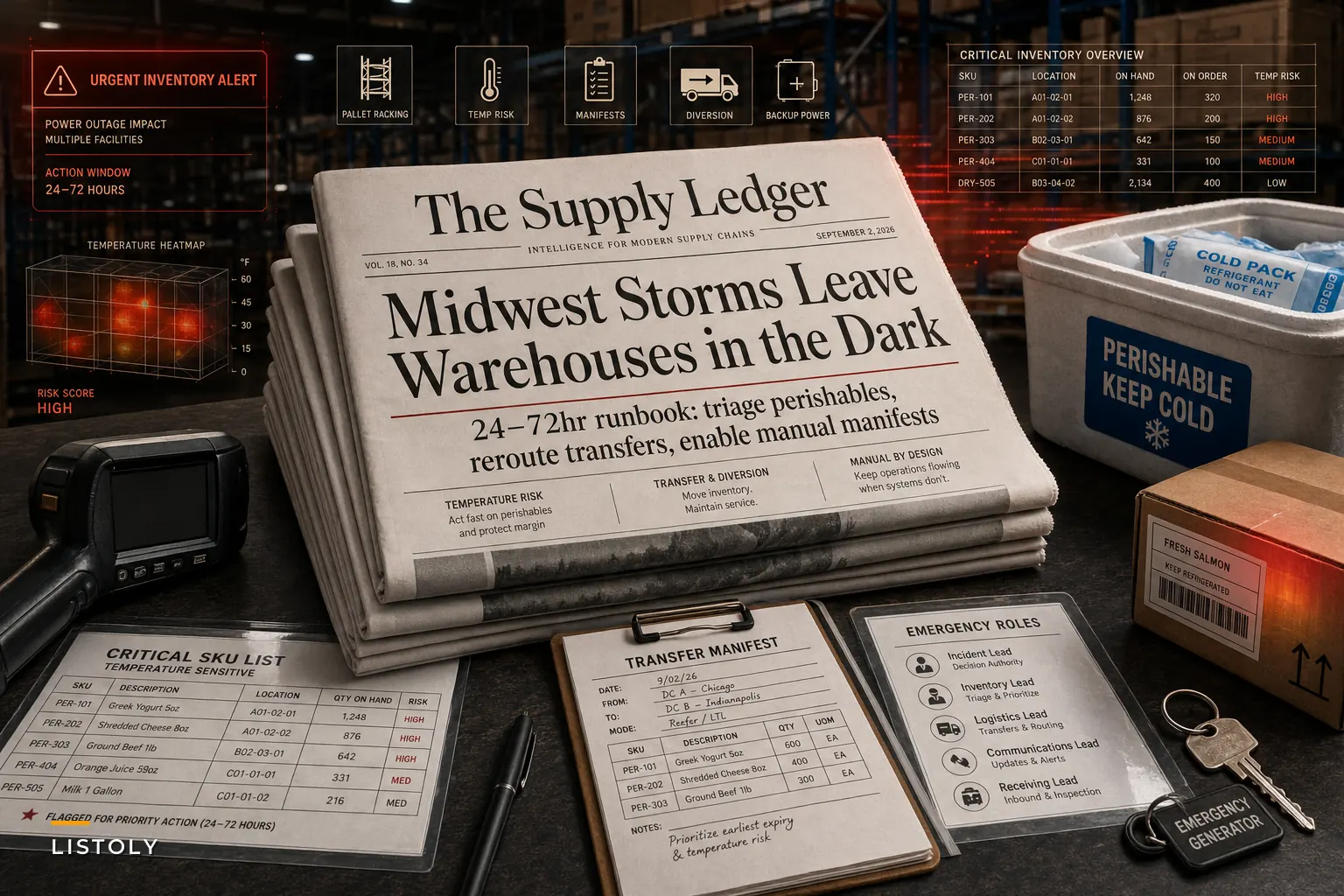

The severe storms that rolled through the Midwest in late August 2026 didn't just take down trees. They knocked out power to hundreds of thousands of homes and businesses and chewed up chunks of local distribution infrastructure. Reuters reported at least two deaths and widespread outages across the region in mid-August, and by late August, CNN was covering damaged transmission poles and extended outages in northwest Indiana. For small operations, "extended" is the word that really stings. A four-hour blip is survivable. A 30-hour outage with no generator and a walk-in cooler full of product is a completely different conversation.
If you manage perishable stock, run transfers between locations, or coordinate with suppliers who might also be sitting in the dark, this isn't abstract. It's a countdown clock. So rather than talking about storm prep in vague terms, this is about what actually happens hour by hour when the power drops — and the decisions that separate a bad week from a genuinely catastrophic one.
The first two hours decide most of your losses
People underestimate this: the first 90 minutes of an outage aren't really about the product. They're about information. The product is fine initially. Your walk-in cooler holds temperature for a while if the door stays shut. What's already broken is your ability to see what you have and decide what to move.
When the power goes, your POS is down, your WMS is unreachable, barcode scanners are useless, and anyone who was mid-count on the receiving dock has a half-finished pallet with no way to record it. The operations that handle these events well versus badly — the good ones already know, on paper, printed and laminated — exactly which SKUs are temperature-critical and where they physically sit.
A typical failure looks like this: a specialty food distributor loses power at 6 a.m. The manager spends the first hour trying to get the inventory system back online through a phone hotspot, restarting the modem, calling the software vendor. Meanwhile nobody's opened the generator fuel valve or started pulling the highest-value chilled product forward for a possible transfer. Two hours gone. That's two hours of a warming cooler and the wrong priorities.
The mistake isn't technical. It's sequencing. Restoring your systems is the last thing that matters in the first two hours, not the first.
A blunt priority order for the opening hours
Run these roughly in order, and don't let anyone skip ahead to "fix the computer":
Never run out of stock or overorder again.
Listoly streamlines inventory workflows to keep your business stocked and profitable.
- Real-time stock tracking
- Automated reorder alerts
- Supplier and purchase management
No credit card required
-
Confirm people are safe and accounted for. Storm cleanup injuries are real. Nobody moves product until you know where your team is.
-
Log the outage start time. Write it down. Spoilage claims, insurance, and vendor credits all hinge on knowing exactly when temperature control stopped.
-
Keep cooler and freezer doors shut. Assign one person to enforce this. A closed walk-in holds safe temps far longer than one that gets opened every ten minutes.
-
Start temperature logging manually. Drop a couple of cheap probe thermometers into your coldest and warmest zones and record readings every 30–60 minutes.
-
Trigger backup power if you have it. Prioritize refrigeration circuits over lighting and office equipment.
-
Identify your "move-first" SKUs. The 15–30 items where spoilage means the most dollars or the most disappointed customers.
-
Only then worry about reconnecting systems.
That order feels obvious written out. Under stress, with your phone buzzing and a vendor asking about a delivery, almost nobody follows it without a printed card in hand.
The temperature math nobody runs until it's too late
Perishables don't fail at a single dramatic moment. They degrade on a curve, and the curve is steeper than most managers assume. A walk-in cooler that starts at 37°F and loses power on a warm, humid post-storm day can drift into the danger zone — above 40°F for refrigerated goods — faster than the "it'll be fine for hours" instinct suggests. Especially if the door gets opened, or the space is only half full.
Here's a rough framework for deciding what to save, hold, or write off. Adjust the thresholds to your own products and local food-safety rules.
| Product category | Safe holding window (no power, door closed) | Decision at 2–4 hrs | Decision at 4+ hrs |
|---|---|---|---|
| Frozen (solid, packed tight) | Longest buffer; ice crystals still present | Hold, keep sealed | Refreeze only if still ice-crystallized, otherwise triage |
| Refrigerated dairy/meat | Short buffer once above 40°F | Prep for transfer or discard prep | Likely write-off if temps climbed |
| Refrigerated produce | Slightly more forgiving | Hold, monitor | Sort salvageable vs. degraded |
| Shelf-stable (climate-sensitive) | Hours to days | Monitor humidity/heat | Move if warehouse heat spikes |
The pattern that comes up again and again is managers treating everything in the cooler as one undifferentiated block. It isn't. The meat and soft dairy force your first triage decision; hardy produce buys you time; frozen goods packed tight are your most patient category. Sorting your response by product category instead of by location is where you recover the most value.
The deeper problem: you can't manage what you can't see mid-outage
Storms expose a weakness that was already there before the first cloud rolled in. Most small operations run their entire inventory picture through a single connected system, and the second that system is unreachable, decision-making collapses to guesswork and whatever someone remembers.
Think about the chain reaction. You can't scan, so receiving stops or gets scrawled on scrap paper. You can't check stock levels, so you don't know if the sister location three towns over even has room for a transfer. You can't confirm what shipped this morning, so you don't know your true exposure. When power comes back, you inherit a mess: unrecorded movements, mystery pallets, counts that no longer match, and a reconciliation job that eats the next three days.
This is what happens when everything lives in one place with no offline fallback. The businesses that recover fastest aren't the ones with the most sophisticated software. They're the ones who kept a parallel, low-tech record during the blackout — a printed snapshot of critical stock, a clipboard for manual receiving, and a shared understanding of who logs what and when.
Multi-location transfers are your best tool — and your biggest coordination trap
If one of your locations still has power (or a working generator) and cooler capacity, moving perishables there is often the single highest-value move you can make. But storm transfers go wrong in specific, predictable ways.
The classic mistake: two managers at two sites both decide to send product to each other at the same time, because neither could see the other's real inventory or available cooler space. Now you've got two refrigerated vans crossing paths on storm-damaged roads, one location suddenly overloaded, and the other still holding at-risk stock it thought was getting rescued.
-
Which location is the designated "cold sanctuary" if it retains power
-
Who has authority to approve an emergency transfer — one person, not a committee
-
What the minimum viable manual manifest looks like
item, quantity, source, destination, time out
-
How you'll confirm receipt when the destination's scanners might also be down
That manual manifest matters more than anything else on that list. Without it, the receiving site can't verify what actually arrived, and you get phantom inventory haunting your counts for weeks afterward.
When emergency transfers actually make sense — and when they don't
When it's worth it: You've got genuinely high-value, high-margin perishables, a nearby location with confirmed cold capacity, and a realistic transport window. Moving $4k–$6k of specialty product 25 minutes down the road to save it is an easy call.
When it's a bad idea: The roads are still hazardous, the receiving site's cold capacity is unconfirmed, or the product value doesn't justify the fuel, labor, and risk. Trucking a van of low-margin produce across a storm-battered county to "save" a few hundred dollars of stock — while burning driver hours you'll need for reconciliation later — is a net loss dressed up as a rescue operation.
Who should not attempt this: Single-location operations with no partner site and no generator. For those businesses, the game is entirely about holding temperature as long as possible, documenting everything for claims, and lining up rapid resupply. Trying to improvise a transfer to a location you don't control usually creates more chaos than it prevents.
A short real scenario
A regional bakery-and-prepared-foods supplier with two production sites lost power at its main facility for about 26 hours during a storm. Their entire chilled inventory — roughly $18k of dairy-based product, dough, and finished goods — was at risk.
The year before, a shorter outage had cost them close to $7k in spoilage plus about two days of reconciliation headaches, mostly because nobody knew what was where and half the losses couldn't be documented well enough for their insurer to act on.
This time they ran it differently. They had a printed critical-SKU sheet, logged the outage start immediately, and had manual temperature readings going within the first half hour. Their second site still had power, so within the first two hours they moved the highest-value dairy and finished goods — around $9k worth — using a handwritten manifest. The rest they held sealed and monitored, writing off only what actually crossed the temperature threshold.
Final spoilage came in around $2,500, and because their logs and manifests were clean, most of it was reimbursable. Reconciliation took under a day. The difference wasn't better refrigeration equipment. It was having decided the sequence and the rules before the lights went out.
Where this connects to your broader planning
An outage is really just one flavor of supplier and infrastructure disruption. When your own power fails, there's a decent chance your local suppliers, freight partners, and last-mile carriers are dealing with the same storm. Emergency sourcing and expedited freight costs spike exactly when you can least afford them, and the vendors you scramble to reach are ones you've never scored or pre-vetted.
That's why storm response shouldn't live in a separate binder from your regular resilience planning. The same trigger levels, backup-supplier scoring, and rapid-sourcing templates you'd build for any disruption apply here — the storm just compresses the timeline. If you haven't built that muscle yet, the guide on supplier contingency planning for SMBs walks through how to score suppliers, set trigger thresholds, and keep rapid-sourcing options ready before you actually need them.
Building the offline layer into your operations
The operations that survive outages well are the ones that don't depend on being online to make good decisions. That means keeping a current, exportable snapshot of critical stock and cold-chain locations you can print or pull up on a phone even when your main system is completely unreachable.
Modern inventory platforms with AI-assisted monitoring can help in a genuinely practical way — flagging which SKUs are temperature-critical, keeping a live map of where those items sit across locations, and generating a ready-to-print emergency snapshot on demand so you're not scrambling to build one at 6 a.m. in the dark. Some setups can also watch incoming weather signals and prompt you to pull that snapshot and pre-stage transfers before an outage hits. The value isn't automation for its own sake; it's that the decision-critical information is already organized when your systems go dark and your team is running on adrenaline.
A simple visual of that workflow makes it easier for teams to run the steps quickly when the lights go out.
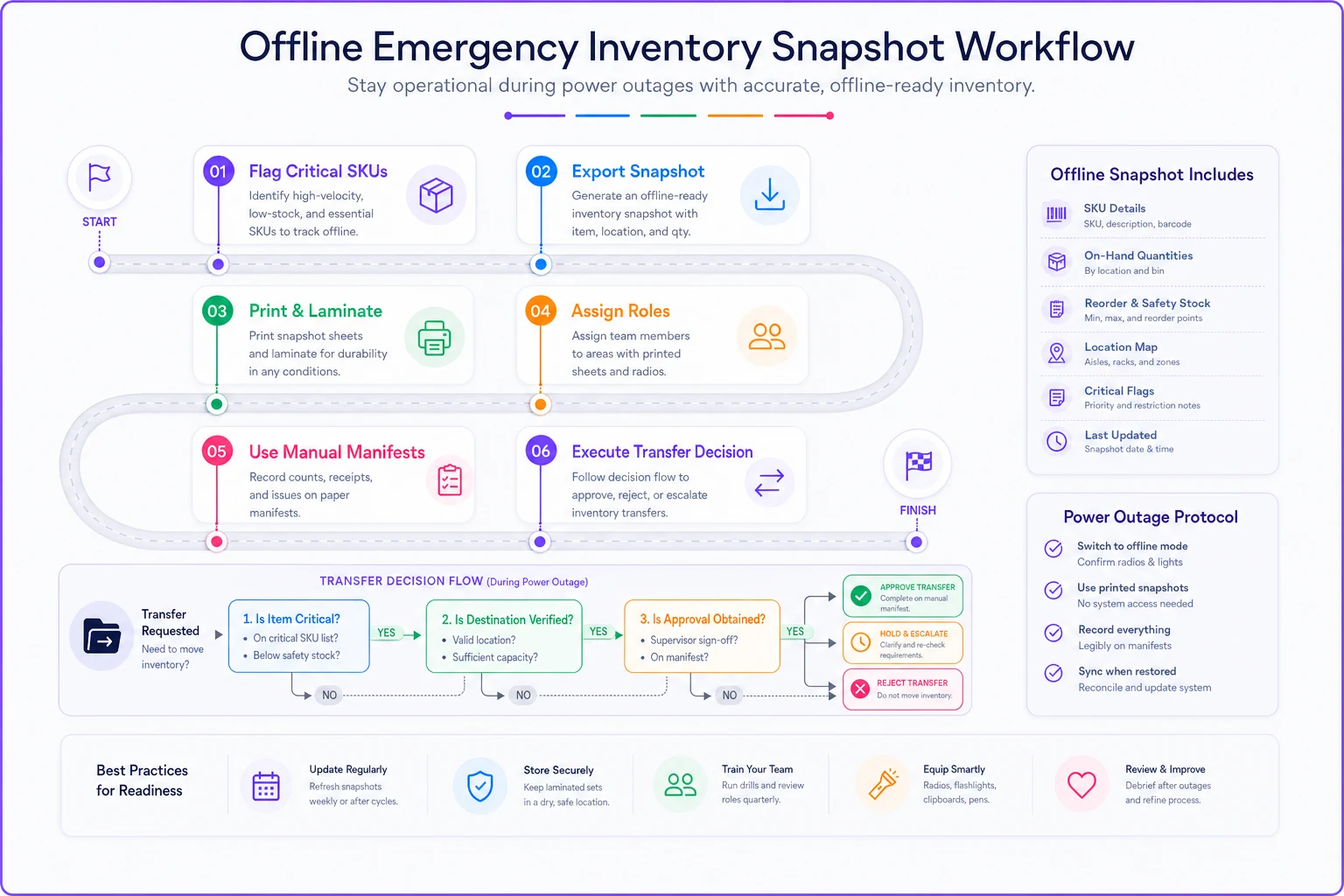
Keep a laminated critical-SKU sheet and a clipboard with blank manual-manifest forms in your emergency kit by the walk-in door.
But the tooling is the smaller half of it. The bigger half is discipline: printed critical-SKU sheets, a designated cold sanctuary, one clear transfer decision-maker, manual manifests, and a logged outage start time. Get those right and the technology just makes them faster.
The takeaway for the next storm
Power outages don't punish businesses for lacking fancy equipment. They punish businesses for not deciding, in advance, what to do in the first two hours and in what order. Perishable losses, phantom inventory, and days of reconciliation are almost always downstream of one thing: nobody had a rehearsed sequence, so the outage forced every decision at once and made them all badly. Print the priority list. Assign the roles. Decide your move-first SKUs and your cold sanctuary before the sky turns green. The storms this August were a reminder that infrastructure fails suddenly and unevenly — and the managers who came through it cleanly weren't lucky. They'd already run this playbook in their heads, so when the lights went out, they were the calmest people in the building.
Ready to optimize your inventory operations?
Join 2,000+ businesses using Listoly to reduce stockouts, save time, and improve order accuracy.