

Most contingency plans fall apart at the exact moment they're supposed to work. Not because the plan was bad, but because nobody knew when to pull the trigger, who was allowed to pull it, and where the backup source was hiding. So the plan sits in a shared drive while a buyer spends four days emailing a supplier who's already ghosting them, and by the time anyone accepts that the shipment isn't coming, the shelf is empty and the marketplace listing is suppressed.
The businesses that handle supplier disruption well don't have better luck or bigger vendor networks. They have a system that converts vague worry ("this supplier feels shaky lately") into a specific action ("Supplier B dropped below trigger level 2, switch the top 6 SKUs to the pre-qualified backup, POs go out today"). That's the whole game. This article is about how to build that system as an SMB — scoring, trigger levels, and rapid-sourcing templates — without hiring a procurement team or buying enterprise software you'll never fully use.
Why supplier problems catch small teams flat-footed
Big companies have dedicated risk functions. In an SMB, supplier risk lives in someone's head — usually the owner or a senior buyer — and it's stored as feelings. "I don't love how they've been responding lately." "Their quality slipped last spring." That intuition is real and often correct, but it doesn't scale and it doesn't transfer. When that person is on vacation, or leaves, the institutional memory of which suppliers are fragile walks out the door with them.
The second issue: everything looks fine right up until it doesn't. Suppliers rarely fail loudly. They fail with a two-day slip on a lead time, then a partial shipment, then a "sorry, raw material shortage, next batch is delayed." Each individual signal is small enough to absorb, so nobody escalates. The failure is cumulative, but the team is reacting one incident at a time. By the time it's obviously a crisis, you've already burned through your safety stock.
There's also a structural problem underneath all of it. Sourcing a replacement takes weeks — samples, quality checks, MOQ negotiation, payment terms — but the disruption gives you days. You can't compress a normal onboarding process into a panic. The businesses that switch fast are the ones who did the slow work before they needed it. Move the expensive, time-consuming part out of the emergency window. That's really the whole point.
Scoring suppliers so risk stops living in someone's head
The goal of a risk score isn't precision. It's to make the invisible visible and force a conversation. You want a number you can glance at and know which suppliers deserve a backup plan and which ones you can leave alone.
Never run out of stock or overorder again.
Listoly streamlines inventory workflows to keep your business stocked and profitable.
- Real-time stock tracking
- Automated reorder alerts
- Supplier and purchase management
No credit card required
Keep the scoring dimensions few and grounded in things you actually observe. Here's a workable set for most SMBs:
| Risk factor | What you're measuring | Low risk (1) | High risk (5) |
|---|---|---|---|
| Lead-time reliability | Variance vs. quoted lead time | Hits date ±1 day | Slips a week+ regularly |
| Single-source exposure | Can anyone else make this? | 3+ alt sources | Only they make it |
| Concentration | % of your COGS through them | Under 5% | Over 25% |
| Financial/operational health | Signs of instability | Stable, responsive | Slow pay hints, layoffs, silence |
| Geographic/logistics risk | Port, weather, tariff exposure | Domestic, flexible | Single foreign port, tariff-sensitive |
| Communication quality | Responsiveness when things go wrong | Fast, honest | Vague, defensive, slow |
Multiply concentration by the rest, or just sum and flag anything over a threshold — the math matters less than being consistent. A supplier that's a 4 on reliability but represents 2% of your spend is annoying, not dangerous. A supplier that's a 3 on reliability but carries 30% of your COGS and is your only source? That's the one that can take the whole business sideways.
One thing this exercise tends to surface is what you might call "hidden whales" — suppliers nobody flagged as risky because they were reliable, but who quietly grew into a huge share of purchasing. Reliability today doesn't offset concentration risk tomorrow. If a solid supplier is 35% of your spend, you still need a plan, because "solid" is a snapshot, not a guarantee. This scoring layer pairs naturally with a broader SMB supplier scorecard and PO-rule playbook — the scorecard tells you how a supplier is performing, the risk score tells you how much it would hurt if they stopped.
Trigger levels: the part everyone skips
Scoring tells you who to worry about. Trigger levels tell you when to act. This is where most plans die, because "watch this supplier closely" is not an action anyone can take at 4pm on a Tuesday.
-
Level 0 — Normal. Supplier performing within tolerance. No action beyond routine monitoring.
-
Level 1 — Watch. One meaningful slip
a late shipment, a partial fill, an unusually slow reply. Action: log it, notify the buyer, check current on-hand coverage for that supplier's SKUs.
-
Level 2 — Prepare. Two or more slips in a rolling window, or one serious event (missed shipment with no clear recovery date). Action: pull the rapid-sourcing template for those SKUs, confirm the pre-qualified backup is still live, run the numbers on switching.
-
Level 3 — Switch. Confirmed failure to deliver within your coverage window, or a hard stop (supplier closes, refuses order, price spike beyond your ceiling). Action: execute the sourcing playbook. POs to backup, reallocate on-hand stock, adjust reorder points.
The discipline here is defining the conditions numerically ahead of time. "Two late shipments in 60 days moves them to Level 2" is a rule you can enforce. "They seem to be struggling" is not. And critically — assign who owns each level. If nobody owns Level 3, everyone assumes someone else is handling it, and the switch never happens.
When trigger levels are a bad idea
If a supplier is 1% of your spend and easily replaceable, don't build a three-tier trigger system for them. You'll drown in monitoring overhead. Trigger levels are for your concentrated, high-score suppliers — the handful where a failure genuinely threatens revenue. For the long tail, "if they fail, we'll just reorder from someone else" is a perfectly good plan. Over-engineering the low-risk suppliers is how these systems become bureaucracy nobody maintains.
The rapid-sourcing template: pre-loading the emergency
The core idea that separates fast switchers from everyone else: the backup supplier work happens before the trigger fires. A rapid-sourcing template is a per-SKU (or per-supplier-group) document you fill out during calm periods so that when Level 3 hits, you're executing, not researching.
-
The at-risk SKUs and their monthly velocity
-
Current on-hand and how many days of coverage that buys you
-
Pre-qualified backup source(s) — name, contact, whether they've already sampled/approved the item
-
Backup MOQ, unit cost, and lead time (so you already know the cost of switching)
-
Any spec, packaging, or compliance differences vs. the primary
-
The reorder-point adjustment needed if the backup has a longer lead time
-
Approval threshold — what dollar amount the buyer can commit without owner sign-off
The uncomfortable truth is that filling this out reveals gaps. You'll discover that half your "backup suppliers" have never actually quoted you, or that the backup's MOQ is triple what you'd ever need, or that switching means a packaging change that requires new artwork. Finding that out during a calm week is a minor inconvenience. Finding it out during a stockout is a disaster.
Review backup contacts and MOQs at least once a year to avoid stale templates.
The switch process, step by step
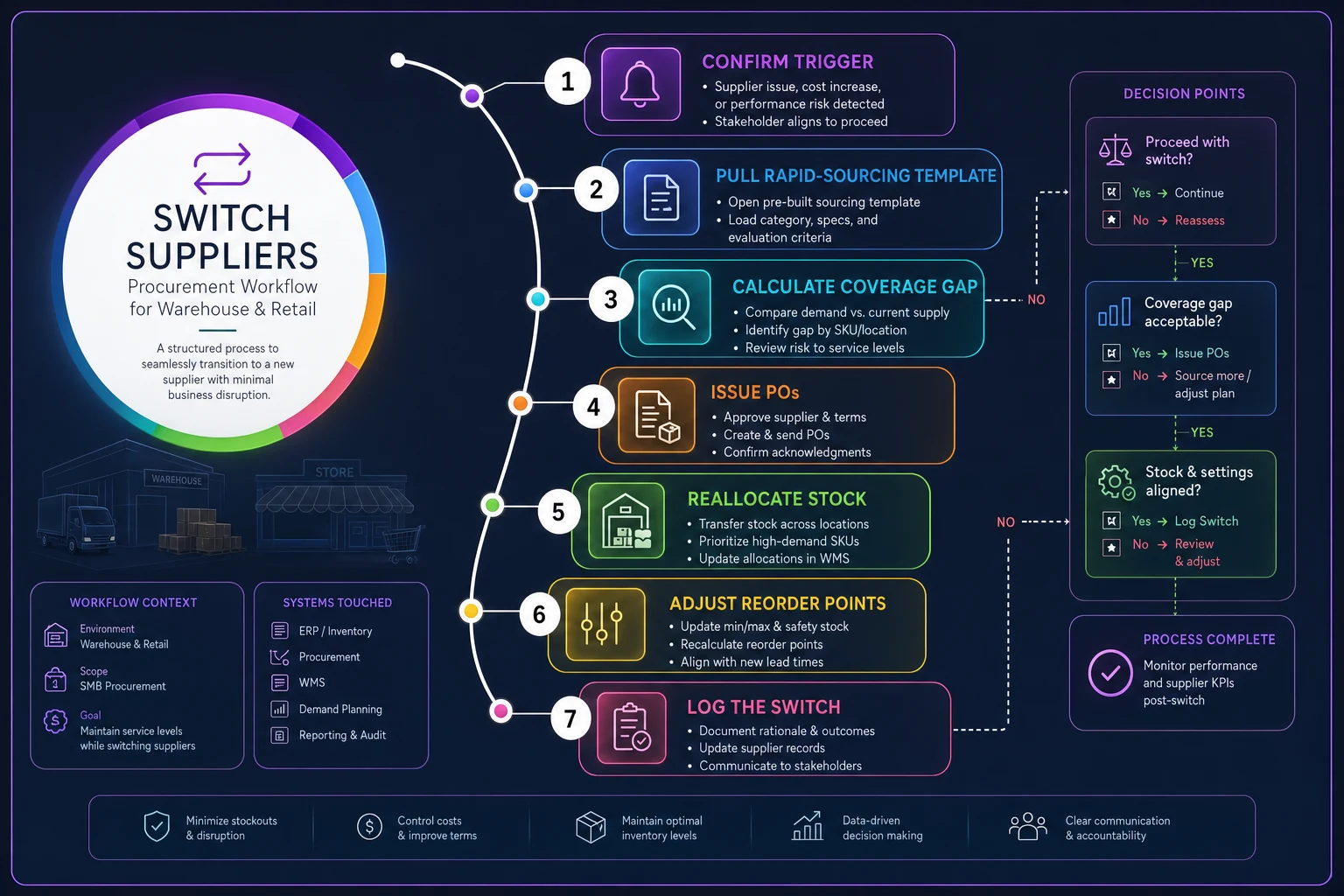
Here's a simple workflow visualization of the switch process.
-
Confirm the trigger is real — not a one-off delay that'll resolve in a day. Check the last communication and the recovery date, if any.
-
Pull the rapid-sourcing template for the affected SKUs and confirm the backup source is still current (contacts change, prices drift).
-
Calculate the coverage gap — days of on-hand stock minus the backup's lead time. This tells you whether you have a smooth switch or a genuine shortage window.
-
Issue POs to the backup within the buyer's approval limit, escalating only what exceeds it.
-
Reallocate existing stock if there's a gap — protect your highest-margin or highest-priority channels first.
-
Adjust reorder points and safety stock to reflect the backup's lead time, which is almost always different from the primary's.
-
Log the switch and downgrade the failed supplier's status so nobody accidentally reorders from them.
That coverage-gap math in step 3 is where variable lead times bite hardest. If your backup runs a three-week lead time and you've got two weeks of stock, you have a one-week hole to manage — and how you handle that connects directly to your replenishment approach for variable lead times. Contingency planning and replenishment aren't separate systems; the switch just becomes a new input into your normal reorder logic.
A real scenario: the sole-source component that almost took down a quarter
A small outdoor-gear assembler — roughly $4M in annual revenue, around 40 active SKUs — built kits around a specialty buckle bought from a single overseas supplier. That supplier was cheap, reliable for years, and represented maybe 18% of COGS. Nobody flagged it because "they've never let us down."
Then a factory relocation delayed shipments by five weeks with almost no warning — a vague email, then silence. The team had about three weeks of buckle inventory. Because there was no pre-qualified backup, they spent the first ten days just finding alternatives, another week getting samples, and by the time a replacement was approved, they'd been out of stock on their two best-selling kits for close to two weeks. Lost sales plus expedited air freight on the eventual replacement order ran somewhere in the $30k–$40k range for a single component failure.
The fix afterward wasn't complicated. They scored their suppliers, found three more "hidden whale" single-source components, and built rapid-sourcing templates for each — including pre-approved backups that had already sampled the parts. About a year later, a different supplier slipped. This time they hit Level 2 after the second late shipment, confirmed the backup, and had replacement POs out before they'd burned through half their safety stock. The disruption cost them a bit of expedited shipping and basically nothing in lost sales. Same category of problem, completely different outcome — because the expensive part of the work was already done.
What breaks as you add suppliers, SKUs, and locations
At 20 SKUs and one location, you can run all of this in a spreadsheet and a buyer's memory. The system creaks when you cross into multiple locations, hundreds of SKUs, or a supplier base large enough that no single person tracks all of it.
-
Signal loss. Late shipments and partial fills get logged in different places — email, a receiving note, someone's memory — so trigger conditions never actually get counted. The two-slips-in-60-days rule only works if the slips are recorded somewhere consistent.
-
Ownership gaps. With more suppliers, "watch this one" gets diffused across the team and nobody clearly owns the switch decision.
-
Stale backups. Pre-qualified backups go stale. Prices change, contacts leave, MOQs shift. A template filled out 18 months ago and never revisited is a false sense of security.
-
Cross-location blindness. A supplier failing for one location may be fine for another, or the failure might hit all sites at once and you don't see the compounding exposure until it's everywhere.
This is where lightweight operational software earns its place — not as a magic risk engine, but as the memory and monitoring layer humans can't sustain manually. When receiving data, PO history, and lead-time performance all live in one system, trigger conditions can be tracked automatically instead of reconstructed from email threads. AI-assisted monitoring can flag a supplier quietly drifting toward a trigger level — gradually slipping lead times, rising partial-fill rates — before a human would connect the dots across dozens of POs. The value isn't replacing your judgment; it's making sure small cumulative signals actually get counted so your pre-set triggers fire when they're supposed to. That's the difference between a plan that lives in a drawer and one that actually runs.
Who should keep this simple (and who genuinely needs the full system)
If you have a handful of suppliers, mostly domestic, mostly replaceable, and no single vendor above roughly 10% of spend — don't overbuild. Score them once, note the one or two that matter, keep a backup contact for those, and move on. A full trigger-level framework for a low-risk supplier base is effort you'll never recoup.
The businesses that genuinely need scoring, trigger levels, and pre-loaded rapid-sourcing templates are the ones with concentration or single-source exposure — a few suppliers carrying a big chunk of COGS, sole-source components, tariff- or port-dependent imports, or products where a stockout suppresses a marketplace listing and takes weeks to recover ranking. If a single supplier failure can dent a whole quarter, the slow prep work is the cheapest insurance you'll ever buy.
Pulling it together
Supplier contingency planning isn't about predicting which vendor will fail — you can't, reliably. It's about pre-deciding your response so the failure, whenever it comes, triggers action instead of scramble. Score your suppliers so risk stops living in one person's gut. Set trigger levels with real numbers and real owners so "watch closely" turns into "switch now." Build your rapid-sourcing templates while things are calm, because the whole reason switches are slow is that people try to do the sourcing and the switching in the same panicked week.
Start with your three or four highest-exposure suppliers. Score them, define what a Level 3 event looks like for each, and fill out one rapid-sourcing template — pre-qualified backup included. That single afternoon of work does more to protect your revenue than any forecast, because it changes what happens on the worst day rather than trying to prevent it.
Supplier contingency planning isn't about predicting which vendor will fail — you can't, reliably. It's about pre-deciding your response so the failure, whenever it comes, triggers action instead of scramble. Score your suppliers so risk stops living in one person's gut. Set trigger levels with real numbers and real owners so "watch closely" turns into "switch now." Build your rapid-sourcing templates while things are calm, because the whole reason switches are slow is that people try to do the sourcing and the switching in the same panicked week.
Start with your three or four highest-exposure suppliers. Score them, define what a Level 3 event looks like for each, and fill out one rapid-sourcing template — pre-qualified backup included. That single afternoon of work does more to protect your revenue than any forecast, because it changes what happens on the worst day rather than trying to prevent it.
Ready to optimize your inventory operations?
Join 2,000+ businesses using Listoly to reduce stockouts, save time, and improve order accuracy.