


Short-cycle surges punish hesitation. A local news segment, a TikTok that catches fire, a competitor going out of stock, a heatwave that clears your fan inventory in two days. You get maybe 48–72 hours of warning — sometimes less — and inside that window you have to decide: throw money at inventory, or throttle demand before you oversell into a hole you can't dig out of.
Most small businesses handle this badly for a pretty boring reason: nobody wrote down the decision in advance. When the spike hits, the owner is texting the buyer, the buyer is on hold with a supplier, and someone is manually pausing ad spend three hours too late. By the time a decision lands, half the window is already gone.
This is a runbook for that window. Not a strategy doc — an actual set of thresholds, templates, and rules you can hand to whoever is on shift when the surge starts.
The core decision: pre-buy or throttle
Every short-cycle surge forces one of two moves, sometimes both at once for different SKUs.
Pre-buy means you commit cash and open an emergency PO (or pull stock forward) to ride the wave.
Throttle means you slow demand — cap channels, raise prices, hide the listing, push ship dates — because you can't get product fast enough and overselling costs more than the lost sales.
The mistake is treating this as a gut call. It isn't. It comes down to three numbers you can nail down in about ten minutes:
-
Sell-through velocity — how fast are you actually moving units right now (last 6–12 hours, not last week's average)?
-
Replenishment window — realistic time to get more sellable stock in position, including receiving.
-
Margin cushion — what's your per-unit margin, and how much of it can an emergency buy eat before the surge stops being worth chasing?
If velocity outpaces your replenishment window and the margin can absorb the emergency premium, you pre-buy. If it can't, you throttle. Everything below is just making that call faster and cleaner.
The threshold table
| Condition | Pre-buy | Throttle | Do both |
|---|---|---|---|
| Cover < 2 days at current velocity, replen ≤ 3 days | ✅ | ||
| Cover < 2 days, replen ≥ 5 days | ✅ | ||
| Cover 2–4 days, replen 3–5 days, margin > 40% | ✅ | ||
| Cover < 1 day, replen ≥ 4 days, high margin | ✅ (buy for tail, throttle for now) | ||
| Emergency premium eats > 60% of margin | ✅ | ||
| Backorder/preorder is credible for your channel | ✅ (as preorder) |
"Cover" here means: units on hand ÷ current daily velocity. The key is using current velocity during the surge, not your baseline. A SKU that normally sells 8/day and is suddenly moving 8/hour has maybe 12 hours of cover left — not four days. People miss this constantly because their dashboard is still showing the trailing 30-day average.
When pre-buy actually makes sense
Pre-buy is the right move when three things line up: your supplier can turn an emergency order faster than your stock runs out, the margin survives the premium, and the demand looks like it'll last more than a day or two.
Never run out of stock or overorder again.
Listoly streamlines inventory workflows to keep your business stocked and profitable.
- Real-time stock tracking
- Automated reorder alerts
- Supplier and purchase management
No credit card required
That last part matters more than people give it credit for. A lot of short-cycle spikes are genuinely short — a viral moment that's dead in 36 hours. If you pre-buy 400 units and the surge evaporates before the PO even ships, you've converted a demand problem into a dead-stock problem. Now you're running markdowns next month.
A useful gut check: if the surge is driven by something repeatable (weather, seasonal patterns, a promo you can extend), pre-buying is safer. If it's driven by a one-time event (a single viral post, a news mention), lean toward throttling and satisfying what you can from existing stock.
For launch-driven spikes where you have no velocity history at all, the math gets shakier — that's a different problem, and the approach in forecasting inventory for product launches and new SKUs with no sales history is more useful than trying to extrapolate from six hours of surge data.
The rapid emergency PO template
Emergency POs fail because they're missing the fields that suppliers actually need to expedite. A normal PO assumes normal lead time. An emergency PO has to explicitly signal "this is different — here's what I'll pay, here's my hard date."
Keep this as a saved template so nobody's writing it from scratch at 9pm:
-
PO # and EMERGENCY flag in the subject line
-
SKU / units — and a fallback quantity ("400 preferred, will take 250 minimum")
-
Need-by date — a hard date, not "ASAP"
-
Expedite authorization — the premium you'll accept (e.g., "will cover air freight up to $X" or "accept up to 8% surcharge")
-
Partial shipment
yes/no
— say yes for surges; a partial shipment now beats a full order in five days -
Ship-to — the location that can receive and turn it fastest, which may not be your main DC
-
Approver name — so the supplier doesn't wait around for confirmation
-
Alternate SKU acceptable
yes/no
— if a close substitute ships faster, will you take it?
The partial-shipment field is the one small buyers consistently forget. During a surge you almost always want split delivery — get 150 units moving tomorrow instead of waiting for all 400 to be ready.
When to throttle instead
Throttling feels wrong to owners because it looks like leaving money on the table. But overselling into a surge you can't fulfill is worse — you get cancellations, chargebacks, angry reviews, and channel account dings that outlast the surge by weeks.
Throttle when the replenishment window is longer than your cover, when the emergency premium wrecks your margin, or when overselling risk is high — multiple channels drawing from one shared pool, no reliable reservation logic between them.
Throttling isn't binary. There's a ladder of options from gentle to hard:
-
Raise price — the softest throttle. A 10–15% bump on a surging SKU slows velocity and protects margin simultaneously. Underused.
-
Cap per-order quantity — limit to 2–3 units so a few bulk buyers don't wipe you out.
-
Extend ship-date messaging — "ships in 5–7 days" self-selects out the impatient buyers.
-
Move to preorder/backorder — you keep the sale but reset the fulfillment clock.
-
Hide or pause listings on secondary channels — concentrate remaining stock where margin is best.
-
Full pause — last resort, only when oversell risk is genuinely dangerous.
Channel throttling examples
The real skill is throttling unevenly across channels. You rarely want to pull back everywhere equally — you want to protect your highest-margin, most-controllable channel and throttle the rest.
-
Own website (margin ~52%)
left fully open, raised price about 12%.
-
Marketplace A (margin ~34%)
capped order quantity at 2, added a 4-day ship estimate.
-
Marketplace B (margin ~28%, slower anyway)
moved to backorder.
Velocity dropped to something the 180 units could actually cover until the PO landed. They avoided every oversell and cancellation, the highest-margin channel absorbed more of the demand, and they preserved a few hundred dollars of margin that a flat price bump everywhere would've left behind. More importantly, marketplace account metrics stayed clean.
The pattern: rank channels by margin and control, throttle from the bottom up.
Emergency transfer rules
Before spending on an emergency PO, check whether you can solve the surge by moving stock you already own. Transfers are faster and cheaper than expedited buys — but only if you have rules that let whoever's on shift pull the trigger without calling a meeting.
The core rule set:
-
Transfer trigger if any location has cover < 2 days AND another location has cover > 10 days for the same SKU, initiate a transfer — no approval needed under a set unit/value threshold (say, under $500 of goods).
-
Direction pull from the slowest-selling location, not the geographically closest. Surge speed matters more than shipping distance most of the time.
-
Don't strand the donor never transfer a location below its own reorder point to feed a surge elsewhere. You'll just move the stockout.
-
Same-day cutoff transfers requested before your carrier cutoff go same-day; after, they're next-day — at that point compare against an emergency PO instead.
Pull from the slowest-selling location, not the geographically closest.
For multi-location operations, the decision between transfer and reorder gets more nuanced, and the variable-lead-time thinking in a replenishment playbook for small businesses handling variable lead times directly affects how you set the replenishment window number in your threshold grid.
The 72-hour runbook, in order
When a surge is detected, this is the sequence. Writing it down removes the "who decides" bottleneck.
-
Confirm it's real (first hour). Is velocity actually spiking or is one big order distorting the number? Look at order count, not just units.
-
Recalculate cover using current velocity. Trailing 30-day average is useless here. Use last 6–12 hours.
-
Check transfer options first. Cheaper and faster than buying. Apply the transfer rules above.
-
Run the pre-buy vs throttle decision against the threshold table. This should take minutes, not a meeting.
-
If pre-buy
fire the emergency PO template.
Hard need-by date, partial shipment yes, expedite authorization filled in. -
If throttle
apply the ladder unevenly across channels.
Protect high-margin channels, throttle from the bottom. -
Set a re-check timer. Surges move; re-evaluate cover every 6–12 hours and adjust.
-
Log the decision and outcome. One line
what you saw, what you did, what happened. This is how the next surge gets handled faster.
Here's a quick visual of the sequence if you want a one-glance workflow for your ops team.
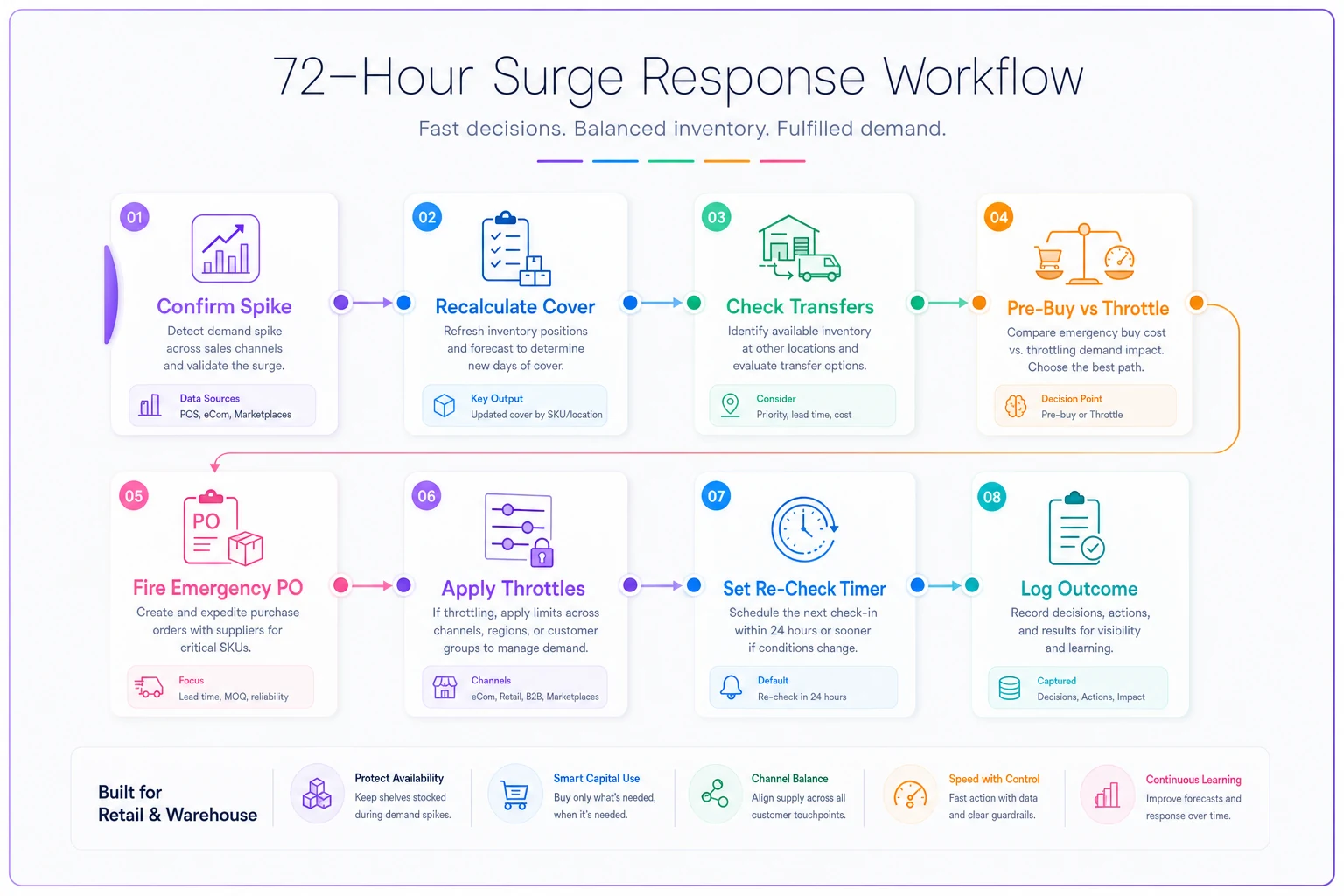
That last step is the one everyone skips. A surge log turns chaos into a pattern library. After two or three events you start recognizing the shape of a surge in the first hour instead of the third.
Where centralized visibility actually matters
None of this works if the numbers are scattered. The reason small businesses lose the first day of a surge is usually that current velocity, stock-by-location, and channel-level inventory all live in different tabs — and someone has to manually stitch them together before any decision can happen.
This is where operational software genuinely earns its keep during a surge. A platform that keeps live stock positions, per-channel velocity, and reorder points in one view lets you run the pre-buy-vs-throttle math in minutes instead of an hour. AI-assisted alerts can flag a velocity spike against current cover before a human catches it on a dashboard. You still make the call — the system just makes sure you're making it in hour one with real numbers, not reacting in hour six off stale averages.
A short real scenario
A small outdoor-gear shop — two locations plus a website — got hit by a regional heat spike that pulled forward demand on portable fans and cooling towels. Fans went from around 5/day to roughly 40/day across both stores combined.
Before they had a runbook, this kind of event meant a scramble: owner texting the buyer, emergency order placed a day late at full expedited freight, around 30 canceled online orders because the website kept selling stock that was already gone from a store shelf.
With the threshold grid and transfer rules in place: they recalculated cover (under 2 days), pulled fans from the slower location same-day, moved the website to "ships in 3–4 days" instead of overselling, and fired an emergency PO with partial shipment to cover the tail end of demand. No cancellations. The expedite premium was smaller because they ordered on hour two instead of day two.
Nothing dramatic — no revenue explosion. Just a messy 72 hours handled cleanly instead of chaotically, and a few hundred dollars of avoided cancellations and freight. Over a full season of small surges, that's the whole game.
The point
Short-cycle surges reward whoever decides fastest with the fewest mistakes. The businesses that handle them well aren't the ones with the biggest budgets — they're the ones who decided in advance what "cover under two days" means for their category, wrote down who can fire an emergency PO without scheduling a meeting, and know which channel to throttle first.
Write your thresholds down before the next surge hits. When it does, you'll be executing a plan instead of inventing one at 9pm.
Ready to optimize your inventory operations?
Join 2,000+ businesses using Listoly to reduce stockouts, save time, and improve order accuracy.