


Most small operations don't fail on inventory because they lack a plan. They fail because the plan lives in three or four people's heads, none of it is written down, and by the time someone notices a supplier is slipping, the reorder window has already closed.
A risk register fixes that — not by adding paperwork, but by forcing you to answer three questions ahead of time: what could go wrong, how bad is it, and who fixes it when it does. The version most SMBs need isn't the sprawling spreadsheet consultants love. It's a tight list of prioritized risks, each with a pre-approved response so nobody has to call an emergency meeting to decide whether to pre-buy or throttle a channel.
Below is how the whole thing fits together — and where it tends to break as you grow.
Why inventory risk is a coordination problem, not a forecasting problem
Almost every "inventory surprise" in a small business is something at least one person saw coming. The buyer knew the supplier had gone quiet. The warehouse lead knew the fast-moving SKU was thinning out. The ecommerce manager knew the promo was going to spike demand.
The problem isn't detection. It's that the signals live in different roles and never get combined into a decision fast enough.
A typical example: a small housewares seller had a supplier quietly stretch lead times from 3 weeks to 6 over two months. The buyer noticed but assumed it was a one-off. The demand planner kept using the old 3-week assumption in reorder math. Nobody connected the two until they blew through safety stock on their top three SKUs during a slow-but-steady sales month — not even a spike, just normal demand meeting a supply gap nobody flagged.
That's what a risk register is really for. It's a shared place where "the supplier feels slow" becomes a tracked risk with a threshold, an owner, and a pre-decided response. It converts vague worry into a triggered action.
The core structure: risk, priority, trigger, mitigation, owner
Every row in a useful register answers five things. Skip any of them and the register turns into a to-do list nobody looks at.
Never run out of stock or overorder again.
Listoly streamlines inventory workflows to keep your business stocked and profitable.
- Real-time stock tracking
- Automated reorder alerts
- Supplier and purchase management
No credit card required
-
The risk — described specifically enough to act on ("Supplier A lead time exceeds 5 weeks," not "supply chain issues")
-
Priority — based on likelihood and how much cash or revenue is exposed
-
The trigger — the exact number or condition that means "act now"
-
The pre-approved mitigation — pre-buy, throttle, transfer, or substitute, decided in advance
-
The owner — one named person, not a department
The word that matters most there is pre-approved. The biggest failure in small operations isn't that people don't know what to do — it's that they wait for permission. When lead time slips, the buyer wants to pre-buy but needs the owner's sign-off, the owner is on vacation, and three days evaporate. A register that says "if trigger X hits, the owner is authorized to spend up to $Y on a pre-buy without further approval" removes that lag entirely.
When lead time slips, the buyer wants to pre-buy but needs the owner's sign-off, the owner is on vacation, and three days evaporate. A register that says "if trigger X hits, the owner is authorized to spend up to $Y on a pre-buy without further approval" removes that lag entirely.
Prioritizing: not everything deserves a mitigation
The instinct is to list forty risks. Don't. Across a lot of small operations, roughly 8 to 12 risks account for nearly all the real damage, and the rest are noise you'll never act on anyway.
A simple way to rank: score each risk on two axes — how likely it is over the next quarter, and how much money is exposed if it hits (lost sales + emergency freight + dead stock). Multiply loosely. You don't need a formula that survives an audit; you need to separate "this could sink a month" from "this is mildly annoying."
Here's a stripped-down version of what a prioritized register looks like for a small multi-SKU operation:
| Risk | Priority | Trigger | Pre-approved mitigation | Owner |
|---|---|---|---|---|
| Key supplier lead time slips | High | Actual lead time > planned + 2 weeks | Pre-buy 6 weeks of A-SKU cover, up to $15k | Buyer |
| Top SKU stockout during promo | High | On-hand < forecast promo demand + 20% | Throttle channel / cap listing qty | Ecom lead |
| Single-location overstock while another starves | Medium | One site >90 days cover, another <15 | Inter-site transfer per matrix | Ops lead |
| Slow-mover aging past shelf window | Medium | 60 days to expiry, >30 days cover | Markdown + halt reorders | Category owner |
| FX / cost spike on imported line | Low-Med | Landed cost up >8% | Re-quote alt supplier, hold reorder | Buyer |
Notice the mitigations aren't clever. Pre-buy, throttle, transfer, substitute. That's basically the whole toolkit. The value is in deciding which one, when, and up to what limit before the pressure hits.
The three workhorse mitigations, and when each actually makes sense
Pre-buy is your response to supply-side risk — lead times slipping, supplier reliability wobbling, or a cost increase you can see coming. It costs you cash and space, so it only makes sense for items where a stockout is expensive and the supplier signal is real. A common mistake is pre-buying slow-movers "just in case," which quietly turns working capital into shelf clutter.
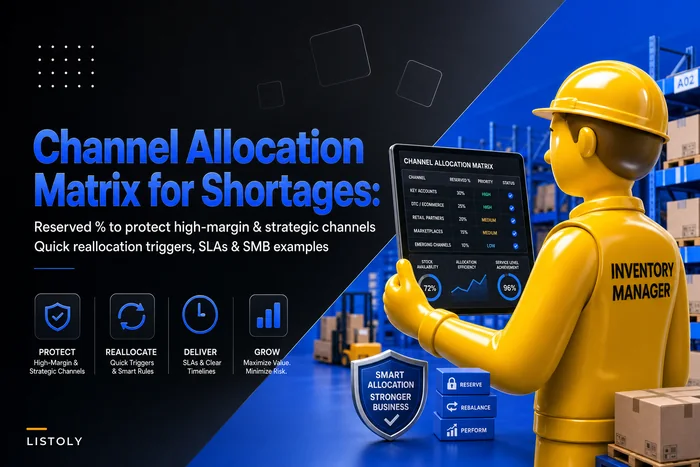
Throttle is your response to demand-side risk — when you can't get more stock in time and the smart move is to slow the outflow. Capping quantity on a marketplace listing, pausing a promo, or reserving stock for your highest-margin channel all count. This one gets underused because it feels like leaving money on the table. But an oversell that turns into a cancellation costs you the sale and the customer relationship and possibly a marketplace penalty. If you sell across channels, your throttle logic should connect directly to how you set reserve percentages — the same thinking behind a channel-allocation matrix for shortages.
Transfer is your response to imbalance — stock sitting in the wrong place. It's the cheapest mitigation when it works, because you already own the goods. The catch is that transfers only pay off when the move cost is low relative to the alternative of an emergency reorder. Getting that math right ahead of time is exactly what a transfer-vs-reorder rules matrix is for, and your register should point to it rather than re-litigate the decision every time.
When a mitigation is a bad idea
Pre-buy is a bad idea when your cash is tight and the risk is only moderate — you'll solve a maybe-problem by creating a definite cash-flow problem. Throttle is a bad idea when the "shortage" is actually a data error and you've got stock you can't see (a POS-vs-warehouse mismatch will make you throttle sales you could've fulfilled). Transfer is a bad idea across sites with wildly different demand patterns, where you're just moving the overstock problem from one shelf to another.
Building a monitoring dashboard that a small team will actually check
A register nobody looks at is just a document. The monitoring layer is what keeps it alive, and for SMBs it needs to be simple — something a busy ops lead scans in two minutes with their coffee.
The dashboard should show only the triggers, and only their status. Green means the metric is inside the safe band. Yellow means it's drifting toward the trigger. Red means the pre-approved mitigation should already be running.
A workable weekly rhythm:
-
Pull the trigger metrics — lead times, cover days by SKU/site, aging stock, landed costs. Whatever your triggers watch.
-
Flag anything yellow or red — you're not reviewing the whole catalog, only what's moving toward a threshold.
-
Confirm owners acted on reds — did the buyer place the pre-buy? Did ecom cap the listing?
-
Re-check yellows next week — most drift back on their own; the point is to catch the ones that don't.
-
Retire or add risks quarterly — suppliers stabilize, new SKUs create new exposure. The register should breathe.
The mistake here is building a dashboard with thirty metrics because you can. Nobody sustains that. The whole design principle is that your dashboard only shows the handful of numbers tied to a pre-decided action. If a metric doesn't have a trigger and an owner behind it, it doesn't belong on this dashboard.
This is also where inventory software earns its keep, quietly. When lead times, cover days, and aging are already tracked in one system, your trigger thresholds can watch those numbers continuously instead of waiting for a human to notice. Platforms with built-in automation can flag a yellow-to-red move and route it straight to the named owner, so the register isn't dependent on someone remembering to run a report. You still make the calls — the system just makes sure the signal reaches the right person before the window closes.
Only put metrics on the dashboard that have a trigger and a named owner.
A simple workflow to visualize the dashboard looks like this.
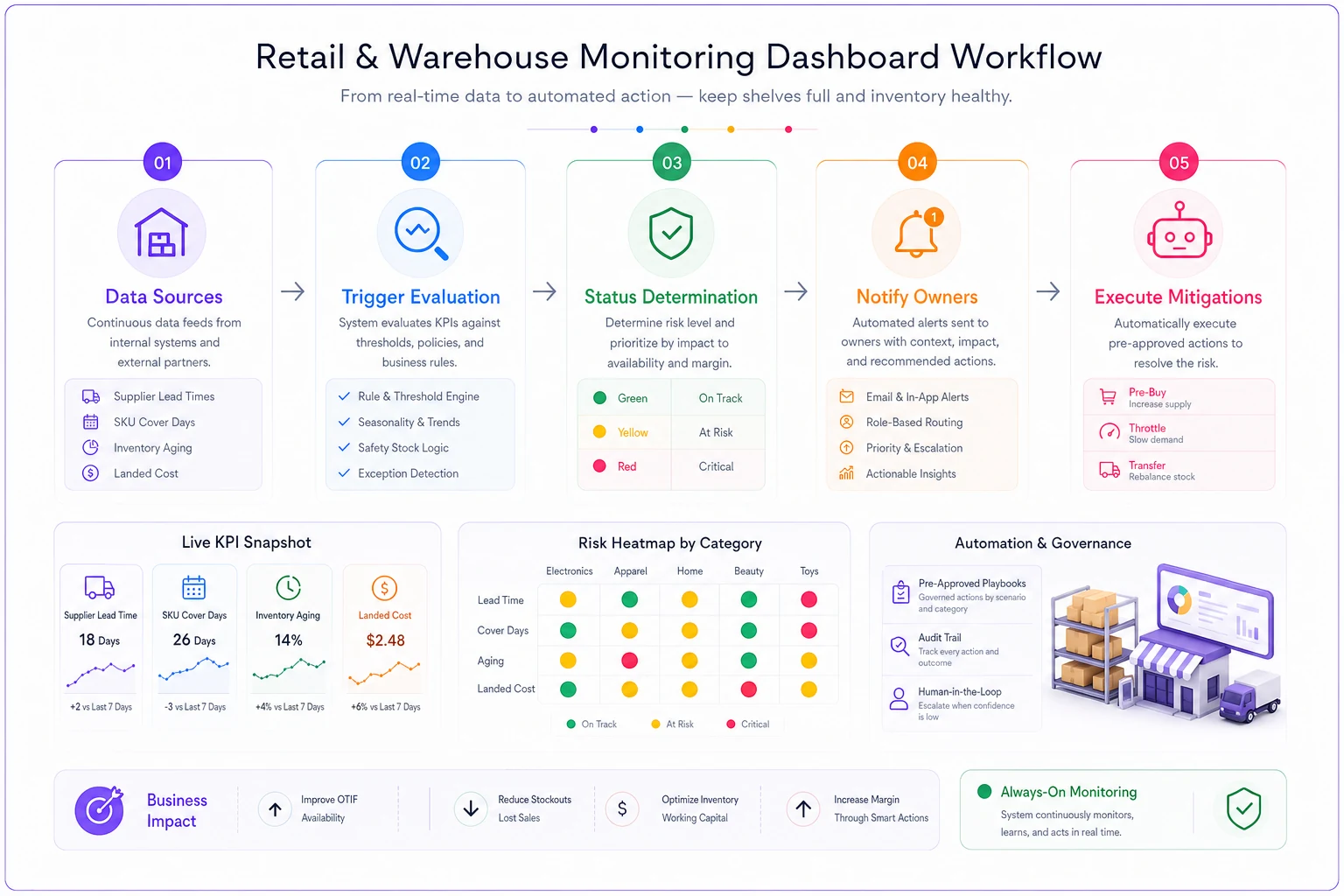
The dashboard should stay a two-minute scan, not a project. Visual cues and direct routing to owners keep the register alive.
A real scenario: the auto-parts distributor
A regional auto-parts distributor running two locations had a recurring pattern: emergency air freight two or three times a quarter, usually on the same dozen fast-moving SKUs, always after a supplier slipped and nobody caught it early.
Their exposure was ugly. Each emergency freight event ran roughly $1,800–$2,500, and they were eating that four to six times a year — call it $9k–$12k annually in freight alone, before counting the sales they lost when even the rush order came late.
They built a register with exactly nine risks. The top one: "Supplier lead time exceeds plan + 10 days," owned by the buyer, with a pre-approved pre-buy authorization up to a set dollar limit. They added a simple cover-days dashboard checked every Monday, with a yellow flag at 20 days of cover and red at 12.
Over the next two quarters, they caught three slipping suppliers in the yellow zone and pre-bought before it became a fire. Emergency freight dropped to a single event across those six months. The register didn't eliminate risk — one supplier still surprised them — but it converted most of their reactive scrambles into planned, cheaper decisions. Rough savings landed somewhere around $6k–$8k, and the bigger win was that the buyer stopped spending Fridays firefighting.
What changes as you grow
At two or three people, the register can live in a shared sheet and survive on the fact that everyone talks daily. The failure mode at this stage is informality — the rules exist but nobody wrote down the dollar limits, so pre-approval quietly becomes "ask the owner anyway."
As you add locations and SKUs, two things break. First, the number of trigger metrics multiplies past what anyone can eyeball weekly, so manual monitoring quietly lapses. Second, ownership gets fuzzy — when you had one buyer, everything was theirs; with three, a slipping supplier falls between roles unless the register names a specific person per risk.
The operations that scale cleanly are the ones that keep the register short even as the business grows. They resist the urge to track everything, tighten the trigger definitions, and lean on their inventory system to watch the metrics so the human review stays a two-minute scan instead of a two-hour report. The register is the decision layer; the software is the watchtower. Keep those roles separate and the whole thing stays manageable.
Where most registers die — and how to keep yours alive
The quiet killer isn't a bad template. It's that the register gets built during a painful month, works for a quarter, then slowly goes stale because nobody owns the register itself. Triggers stop matching reality, owners change roles, and one day you realize the document describes a business you no longer run.
So name an owner for the register, not just for each risk. Give it a standing 20-minute review each quarter. Prune ruthlessly. A register with nine live, trusted risks beats one with forty that everyone ignores.
Inventory risk in a small operation was never really about predicting the future perfectly. It's about deciding — calmly, in advance — what you'll do when the predictable stuff goes sideways, and making sure the person who needs to act already has the authority to. Get that in place, and most of your emergencies turn back into ordinary decisions.
Ready to optimize your inventory operations?
Join 2,000+ businesses using Listoly to reduce stockouts, save time, and improve order accuracy.