


Running multiple locations sounds great until you're staring at 40 units sitting idle in Location A while Location B is out of stock and you're trying to figure out whether to pay rush shipping on a new order or move what you already own. This gets worse somewhere around 5+ locations when every transfer decision starts feeling like three-dimensional chess with cardboard boxes.
The real operational mess kicks in around location 3 or 4. That's when manual tracking falls apart, when "just call the other store" stops being a viable strategy, and when transfer costs start quietly eating into margins because nobody actually ran the numbers on whether moving 20 units is cheaper than ordering 30 fresh ones.
Most SMB multi-location inventory transfers happen on gut feeling. Someone notices excess stock, makes a call, arranges a transfer. No math, no rules, just reaction. That works fine until you're transferring the same SKUs back and forth every month, burning labor and transport costs while stockouts keep happening anyway.
The hidden math behind transfer decisions
Every transfer decision comes down to comparing four numbers that most businesses never actually sit down and calculate: transfer cost per unit, reorder cost including shipping, time-to-arrival difference, and the opportunity cost of stockout days. Sounds simple, but how they interact creates surprisingly messy decisions.
Typical scenario: Location A has 25 units of a SKU moving at 2 per week. Location B is out and selling 8 per week. Reordering takes 12 days and costs $8 per unit with shipping. Transferring takes 2 days at $1.50 per unit if you bundle it with other moves.
The math says transfer, obviously. But what if Location A spikes next week? What if you could get rush shipping for $2 extra and have stock in 5 days? What if the transfer vehicle breaks down? The decision tree expands fast.
With 10 locations, you're looking at 45 possible transfer routes for every SKU. No wonder most businesses just wing it.
The ones that get this right build simple decision rules around velocity ratios and weeks of stock on hand. If Location A has more than 8 weeks of inventory and Location B has less than 2, the transfer happens automatically. No debate, no analysis paralysis, just execution.
Why standard min/max fails at multiple locations
Traditional min/max assumes each location operates independently. Hit the min, order to max, repeat. Works fine for a single warehouse. Add a second location and suddenly you're ordering fresh inventory while the same SKU gathers dust 30 miles away.
Never run out of stock or overorder again.
Listoly streamlines inventory workflows to keep your business stocked and profitable.
- Real-time stock tracking
- Automated reorder alerts
- Supplier and purchase management
No credit card required
The breakdown is structural. Location A hits its reorder point and places an order. Location B is sitting on 3 months of that same item. By the time anyone notices, the order's in, the money's gone, and you're paying to store inventory you didn't need.
A coffee roaster with 4 locations was ordering green beans to each cafe independently. They were sitting on around $45k of duplicate inventory before someone actually mapped total stock across all four locations. Each location was following their min/max perfectly. The system worked exactly as designed—just not how the business needed it to.
The fix isn't complicated, but it requires thinking in network terms rather than individual locations. You need network-wide visibility first, then transfer triggers that fire before reorder triggers. The whole idea is to check whether you can shuffle existing inventory before spending money on new stock.
Transfers should be your primary replenishment method. Reorders are the backup plan.
Building transfer priority rules that actually work
Start with velocity-based priorities. Fast-moving locations get first dibs on transfers. If Location B sells 50 units per week and Location C sells 10, Location B wins every time. Simple rule, real impact.
Next layer is distance penalties. A 10-mile transfer might run $0.50 per unit. A 200-mile transfer could hit $3. Build a basic matrix: if transfer cost exceeds 40% of item value, skip it unless there's an immediate stockout.
Then add time windows. Transfers only happen on designated days when vehicles are already moving between locations—Monday and Thursday for most retail operations. This bundles transfer costs and kills decision fatigue. Stock gets evaluated twice weekly, transfers happen or they don't, and the system moves on.
The key insight: don't try to optimize every transfer. Build rules that make good-enough decisions quickly. Perfect optimization across 10 locations requires math that changes daily and nobody will actually maintain. Consistent good-enough rules beat perfect math that never gets executed.
Here's a transfer priority matrix worth actually using:
| Receiving Location Status | Donor Location Weeks of Stock | Transfer? |
|---|---|---|
| Under 1 week stock | Over 6 weeks | Immediate |
| Under 2 weeks stock | Over 8 weeks | Next window |
| Under 3 weeks stock | Over 12 weeks | Consider |
| Over 3 weeks stock | Any | No transfer |
The rules get stricter as urgency decreases. That's intentional—it prevents unnecessary shuffling while making sure critical moves happen fast.
Transit buffers and the 48-hour rule
Every transfer creates dead time—inventory that's neither sellable at origin nor available at destination. This transit gap kills availability metrics and creates phantom stockouts that are hard to explain to customers.
Location A ships 30 units to Location B. During the 2-day transit, Location A gets a bulk order for 25 units. They can't fulfill it because the inventory is gone but hasn't arrived. Location B can't help either. The stock is sitting in a truck somewhere.
Smart operations build transit buffer rules around this. Never transfer more than 50% of on-hand stock unless the donating location has 4+ weeks of inventory. Always keep 48 hours of safety stock at high-velocity locations. These two rules prevent most transit-induced stockouts.
Never transfer more than 50% of on-hand stock unless the donating location has 4+ weeks of inventory.
Some businesses track "in-transit inventory" as a virtual location. That usually adds more complexity than it solves for smaller operations. Better to set conservative transfer quantities and accept a little inefficiency than to get caught explaining to a major customer why their order can't ship because product is "somewhere between locations."
The 48-hour rule: calculate 2 days of peak demand for each SKU at each location. Transfers don't drop you below that threshold. Yes, some transfers that should happen mathematically won't. That's a reasonable tradeoff.
When to break your own rules
Every rule needs escape hatches. New product launches, seasonal swings, and large orders all justify ignoring standard transfer logic.
Pool supply companies transfer most chlorine tablets from northern stores to southern stores in October. This technically violates every safety stock rule but makes complete operational sense—northern stores won't move chlorine until May. A customer wanting 500 units delivered to Location B when everything sits at Location A is another obvious case where the rules don't apply.
The problem is when exceptions become habits. When "emergency transfers" are happening every week, that's not an emergency—that's a broken system.
Build override authority into the process. Transfers under $500 follow standard rules. $500-$2,000 needs manager approval. Over $2,000 requires operations director sign-off. This creates just enough friction to prevent casual rule-breaking without making exceptions impossible.
And document every override. Why it happened, who approved it, what the outcome was. Without that paper trail, exceptions drift into default behavior within a few months.
Setting up inter-location min/max templates
Standard min/max templates assume stable demand at each location. Multi-location operations need templates that adjust based on what's happening across the whole network.
Start with baseline min/max for each location operating independently—this is your fallback when transfers aren't available. Then create network-adjusted thresholds. If total network inventory is above 12 weeks of demand, individual location max levels drop by 30%. If it falls below 4 weeks, min levels go up by 20%.
Implementing this is simpler than it sounds. Build three template versions: network-high, network-normal, network-low. Switch between them based on total inventory position. Most businesses only need to update templates once a month.
Here's what this looks like for a 5-location bike shop selling a popular tire model:
Network-Normal Template:
-
Location A (flagship)
Min 20, Max 60
-
Location B (downtown)
Min 15, Max 45
-
Location C (suburbs)
Min 10, Max 30
-
Location D (college)
Min 12, Max 35
-
Location E (tourist)
Min 8, Max 25
Network-High Template (total inventory >12 weeks):
-
All locations
Reduce max by 30%, maintain min
-
Transfer excess to highest-velocity location
-
No reorders until network drops below 10 weeks
Network-Low Template (total inventory <4 weeks):
-
All locations
Increase min by 20%
-
Priority reorder to highest-velocity location
-
No transfers unless preventing stockout
This template approach works because your team can actually understand and execute it. They know which template is active and what it means for daily decisions—no guesswork.
The transfer window system
Random transfers destroy operational efficiency. Trucks going out half-empty, staff scrambling to pick transfer orders last-minute, receiving locations unprepared for incoming inventory. The chaos compounds with every location you add.
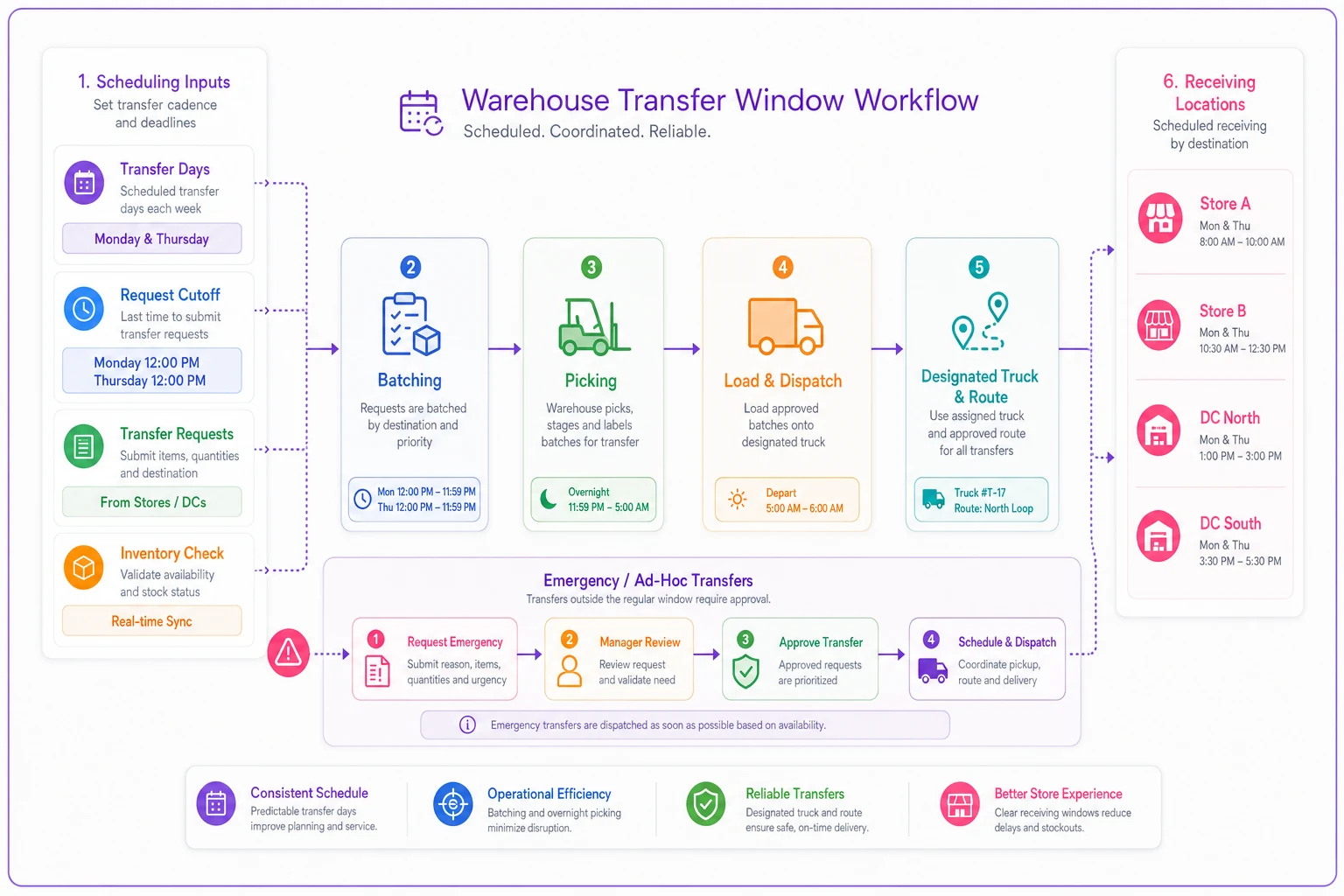
Transfer windows fix this through scheduled, predictable movement. Transfers happen Monday and Thursday. That's it. This single constraint forces better planning and slashes coordination overhead.
Here's a simple visual of a transfer-window workflow.
Window rules that actually work:
-
Transfers requested by Thursday noon ship Monday
-
Transfers requested by Monday noon ship Thursday
-
True emergencies can go anytime but need director approval
-
Each window has a designated truck and route
-
Receiving locations know exactly when to expect inventory
The predictability changes everything. Warehouse staff batch transfer picks. Drivers run efficient routes. Receiving teams schedule labor appropriately. What used to be daily chaos becomes routine.
A furniture retailer with 7 locations cut transfer costs by around 40% just by moving from ad-hoc to window-based transfers. They weren't transferring less inventory—actually more—but the batching and route optimization made each transfer cheaper.
The hardest part is holding the line when someone's screaming about urgent needs. Every exception weakens the system. Having clear criteria for what counts as a true emergency—customer physically waiting, confirmed stockout with a sale pending—versus what can wait 2-3 days makes that easier to defend.
Prioritization logic for low-automation teams
Without a system, prioritization usually means whoever complains loudest gets the transfer. Works poorly and creates resentment between locations.
A simple scoring system that anyone can run:
-
Days of stock remaining (fewer = higher priority)
-
Weekly velocity (higher = higher priority)
-
Transfer cost per unit (lower = higher priority)
-
Historical stockout frequency (more = higher priority)
Score each transfer request on these four factors. Highest total wins. Ties go to the location with higher revenue contribution.
This takes maybe 2 minutes per SKU. Build a basic spreadsheet template—input current stock, weekly sales, and transfer distance. The sheet does the math, ranks the transfers, and you execute in order until the truck's full or you run out of candidates.
For teams running on spreadsheets or basic inventory systems, this approach beats complex optimization. The scoring is transparent, consistent, and something you can actually explain. Location managers understand why their transfer happened or didn't.
A real deployment across 6 locations
A specialty food distributor with 6 locations was losing money on redundant inventory and stockouts simultaneously. Each location ordered independently, transfers happened randomly, and they were sitting on around $180k of excess inventory while still hitting stockouts weekly.
The fix was a transfer matrix built around velocity ratios and distance costs. If Location A had 8+ weeks of stock and Location B had under 2 weeks, automatic transfer trigger. If transfer cost exceeded $2 per unit, reorder instead—unless facing stockout within 5 days.
Monday/Thursday windows replaced the daily chaos of random transfer requests. One van for transfers, efficient routes hitting all locations, batch picking on Sunday and Wednesday nights.
Results after 90 days:
-
Total inventory down from $180k to $145k
-
Stockouts reduced by roughly 60%
-
Transfer costs dropped from around $3,200/month to $1,850/month
-
Staff time on transfers cut from 25 hours/week to 12 hours/week
The biggest change wasn't the numbers. It was the operational calm. Location managers stopped fighting over inventory. Warehouse staff stopped scrambling for emergency transfers. The system just worked.
They still break the rules occasionally—last month's food festival required moving 70% of portable refrigeration units to one location. But those are genuine exceptions now, not daily firefighting.
Scaling beyond manual coordination
Manual coordination starts breaking down around 8-10 locations. Not because the math gets harder, but because human communication bandwidth hits a ceiling. Too many phone calls, emails, and spreadsheets flying around. Mistakes compound.
This is where systematic replenishment rules become critical. You need triggers that fire automatically, not based on someone remembering to check inventory levels at the right time.
The transition usually happens in stages. First: centralized visibility, where everyone sees all locations' stock levels in real time. Second: automated transfer suggestions based on your rules—the system flags opportunities but humans still approve. Third: automated execution for routine transfers under certain value thresholds.
Even basic multi-location inventory software beats spreadsheet coordination once you're past 5 or 6 locations. Real-time network-wide visibility alone changes decision quality dramatically.
For lean operations, the automation doesn't need to be sophisticated. Email alerts when transfer triggers fire. Daily transfer recommendation reports. Automatic transfer order generation that routes for approval. These simple automations kill most coordination overhead while keeping humans in the loop.
Build the rules and processes first, then automate them. Businesses that try to automate broken processes and wonder why the software doesn't help are making a classic sequencing mistake. Get the transfer logic working manually, prove it reduces costs and stockouts, then systematize it.
Making it sustainable without complex software
The best transfer system is one your team will actually use six months from now. Complex optimization models that need ongoing technical maintenance won't survive in most SMB environments.
Build sustainability through templates and checklists. A one-page transfer decision guide at every location. Weekly transfer planning in 30 minutes using a standard template. Monthly performance review in an hour.
The process, kept simple:
-
Every Thursday and Monday morning, run the transfer opportunity report
-
Score each opportunity using the 4-factor system
-
Execute transfers in rank order until truck capacity or budget is hit
-
Document any override decisions
-
Ship transfers same day
-
Review transfer performance monthly, adjust rules quarterly
This process runs indefinitely without consultant support or sophisticated tooling. Your operations manager can train someone new in an hour. Location managers know their role.
Quick sustainability test: could your business maintain this system if you personally disappeared tomorrow? If not, it's too dependent on tribal knowledge. Simplify until the answer is yes.
Multi-location inventory transfers aren't about perfection. They're about consistent rules and the discipline to execute them. Build simple rules that make good decisions most of the time. Stick to them. Review quarterly. That approach beats sophisticated optimization that nobody maintains.
For businesses ready to move beyond spreadsheets, operational software with multi-location inventory management and automated transfer logic handles most of the coordination overhead. The system tracks stock across locations, triggers transfers based on your rules, and generates pick and ship documents automatically. For businesses dealing with unpredictable demand patterns, pairing this with solid safety stock and reorder point logic makes the whole system more resilient. But even without the software, the frameworks above will change how efficiently inventory moves between your locations.
The businesses winning at multi-location inventory aren't the ones with the fanciest optimization. They're the ones with clear rules, consistent execution, and the discipline to hold their transfer windows even when it's inconvenient. Build that foundation first. Everything else follows.
Ready to optimize your inventory operations?
Join 2,000+ businesses using Listoly to reduce stockouts, save time, and improve order accuracy.