



Running multiple sales channels feels like the obvious move until you're staring at three angry emails from customers who all ordered the same last unit of your best-selling product. The marketplace inventory sync patterns most businesses cobble together usually hold up fine... until they don't.
The real problem isn't technology. It's that each marketplace plays by different rules, processes orders at different speeds, and handles cancellations in completely different ways. Your inventory system might update every 15 minutes, but Amazon can process three orders in 90 seconds. That gap creates oversells that damage your seller metrics and force you into awkward cancellation conversations.
Certain patterns consistently work better than others across different implementations. Not perfect solutions—those don't really exist when you're dealing with marketplace lag times—but practical approaches that reduce oversells from happening weekly to maybe once every few months.
Why standard sync approaches fail with marketplace selling
Most inventory sync setups treat all channels equally. They take your available stock, push the same number to each marketplace, then try to update everything when an order comes through. Sounds logical. Works terribly.
The fundamental issue is that marketplaces don't behave like your own website. Amazon holds inventory for customers during checkout. eBay processes fixed-price listings differently than auctions. Walmart Marketplace can take 20 minutes to acknowledge an inventory update. Your Shopify store updates instantly.
These timing differences create what I'd call "phantom availability windows"—periods where inventory shows available on multiple channels even though it's already been claimed elsewhere. A typical scenario: Customer A starts checkout on Amazon at 2:14 PM for your last unit. Amazon reserves it for them for 15 minutes. At 2:15 PM, Customer B completes a purchase on eBay for the same unit because your sync hasn't caught up. Now you have two orders for one item.
The traditional response is to sync more frequently. But even syncing every 60 seconds won't solve this because the problem isn't update frequency—it's that different platforms operate on different timelines entirely. You need asymmetric rules that account for each channel's actual behavior.
Conservative reservation windows that actually prevent oversells
The most effective pattern for preventing oversells isn't trying to sync faster—it's building buffer zones into your channel allocations. Instead of showing 10 units available everywhere when you have 10 in stock, you show 8 on Amazon, 7 on eBay, and keep 2 hidden as overflow protection.
Never run out of stock or overorder again.
Listoly streamlines inventory workflows to keep your business stocked and profitable.
- Real-time stock tracking
- Automated reorder alerts
- Supplier and purchase management
No credit card required
Here's the reservation formula that works across most product categories:
Base inventory: Your actual available stock Channel reservation: Stock shown on each marketplace Buffer pool: Hidden units for oversell protection
For fast-moving items (selling 5+ units daily):
-
Amazon
Show 80% of available stock
-
eBay
Show 70% of available stock
-
Walmart/other
Show 60% of available stock
-
Your website
Show 90% of available stock
For slow movers (selling less than 1 unit daily):
-
All channels
Show actual stock minus 1
The percentages aren't arbitrary—they're based on each platform's typical order velocity and processing delays. Amazon moves fastest, so it gets the highest allocation. Newer marketplace channels get more conservative allocations because their APIs tend to be less reliable.
Keeping a hidden buffer can reduce cancellations enough that total sales rise over time by protecting your seller metrics.
One counterintuitive thing worth mentioning: keeping buffer inventory hidden actually increases total sales in the long run. Businesses worry about missed sales from not showing full availability, but the reduction in cancellations and better seller metrics more than compensate. A cancelled order on Amazon hurts your account health for months. Showing 8 units instead of 10 and missing one potential sale barely registers by comparison.
Channel priority rules when stock runs low
When inventory drops below 5 units, percentage-based rules stop working. You need explicit channel priorities that maximize profit while maintaining account health.
| Stock Level | Primary Channel | Secondary | Others |
|---|---|---|---|
| 4-5 units | Your store (full margin) | Amazon (volume) | Hide from others |
| 2-3 units | Your store only | Amazon (1 unit max) | Hidden |
| 1 unit | Your store only | All others hidden | Hidden |
This assumes your own store gives you the highest margin. If Amazon drives 80% of your revenue, flip the priority. The key principle: concentrate remaining inventory where it delivers the most value instead of spreading it thin.
Where most businesses mess up the implementation is updating these rules manually when stock gets low. By the time someone notices and adjusts allocations, oversells have already happened. The threshold triggers need to be automatic. When stock hits 5 units, your system should immediately redistribute according to your priority rules without anyone having to touch it.
Some businesses try to get fancy with dynamic priorities based on conversion rates or seasonal patterns. Unless you're moving hundreds of SKUs daily, stick with static priorities. The complexity isn't worth the marginal improvement.
Cancellation handling across different marketplaces
Every marketplace punishes cancellations differently, and most inventory systems don't account for these varying penalty structures. Amazon's cancellation rate affects your Buy Box eligibility. eBay tracks defect rates that can restrict your account. Walmart Marketplace can suspend you for excessive cancellations.
Build platform-specific cancellation thresholds into your sync logic.
Amazon cancellations: Never exceed 2.5% of orders. When you're approaching 2%, switch to ultra-conservative mode—show only 50% of actual stock until your rate recovers.
eBay cancellations: Keep below 2% for Top Rated Seller status. Unlike Amazon, eBay lets you message buyers to mutually cancel, which doesn't count against you. Use this when possible.
Walmart Marketplace: They're the strictest. Stay below 1.5%. When you must cancel, do it within 2 hours of order placement for minimal impact.
Your cancellation workflow should follow this sequence:
-
Check if item is available from supplier (even at higher cost)
-
Offer customer upgrade to similar item at same price
-
Offer expedited shipping on backorder
-
Last resort
Cancel with platform-appropriate method
The economics usually favor eating the cost on a handful of orders rather than damaging your seller metrics. Paying $20 extra to dropship an item beats losing Buy Box eligibility for weeks.
Reconciliation patterns that match marketplace behaviors
Marketplace inventory doesn't just need to sync—it needs to reconcile. Orders get cancelled, returns process at different speeds, and platforms occasionally lose sync entirely. Without proper reconciliation, your inventory drifts further from reality over time.
The reconciliation pattern that actually works runs on three different schedules:
Rapid reconciliation (every 30 minutes):
-
Check for new orders across all channels
-
Update available inventory based on confirmed orders
-
Flag any discrepancies for review
Deep reconciliation (every 4 hours):
-
Pull full inventory status from each marketplace
-
Compare against your source of truth
-
Force update any channels showing incorrect stock
-
Log all adjustments for pattern analysis
Full audit (daily at 2 AM):
-
Download all orders from past 24 hours
-
Match against inventory movements
-
Identify any phantom inventory or missing orders
-
Reset all channel allocations from scratch
Most businesses only do rapid updates and wonder why inventory drifts over time. The daily full reset is the safety net that prevents small errors from compounding into major problems.
Real example: a sporting goods seller thought their inventory was syncing perfectly until a full audit revealed eBay had been silently rejecting quantity updates for certain SKUs due to an API change. They'd been showing phantom inventory for two weeks. A daily reset would have caught this immediately.
Here's a visual of the reconciliation workflow.
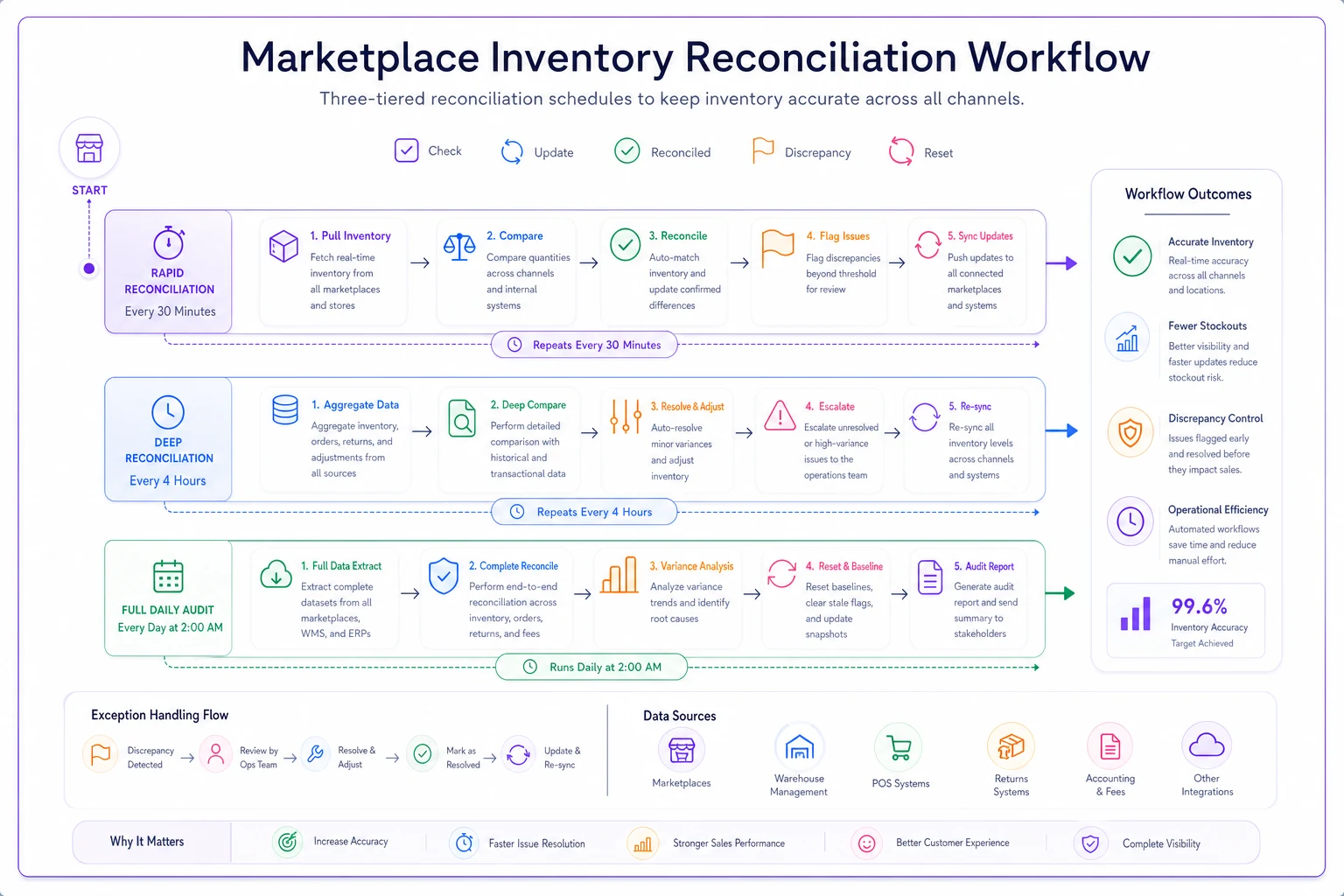
The diagram shows the processes running on their own cadence and how discrepancies flow into escalation paths.
Building your marketplace sync template
Taking these patterns and turning them into an operational system requires the right template structure. Here's how to implement marketplace inventory sync patterns that actually hold up:
Start with your channel configuration:
-
Primary
[Your highest-margin channel]
-
Secondary
[Your highest-volume channel]
-
Tertiary
[Everything else]
-
Orders
Every 5 minutes
-
Inventory updates
Every 15 minutes
-
Full reconciliation
Every 4 hours
-
Complete reset
Daily at low-traffic time
-
Fast movers
20% buffer
-
Slow movers
1 unit buffer
-
New products
30% buffer for first 30 days
-
Discontinued
No buffer, actual stock shown
Then create your escalation triggers:
-
Stock below 5
Switch to priority mode
-
Cancellation rate above 2%
Conservative mode
-
Sync failure
Reduce all channels by 20%
-
Returns processing
Add to buffer, not available stock
-
3+ oversells in one week
-
Inventory drift exceeds 5%
-
New marketplace added
-
Seasonal transition periods
The template needs to be simple enough that someone can update it without breaking everything, but comprehensive enough to handle edge cases. Most businesses overcomplicate this. Start with basic rules, add complexity only when specific problems repeat.
Common pitfalls and fixes
The patterns above work, but implementation details determine success. Here are the mistakes that tank most marketplace sync projects:
Trusting marketplace numbers: Marketplaces occasionally return incorrect inventory data through their APIs. Always maintain your own source of truth. When Amazon says you have 10 units available but your system shows 8, trust your system.
Ignoring return lag: Returns don't instantly become available inventory. Different platforms process returns at different speeds. Add returned items to your buffer pool first, then move them to available stock only after physical verification.
Forgetting about kits and bundles: If you sell both individual items and bundles containing those items, your sync logic needs to account for component inventory. Most systems handle this poorly. Better to manage bundles as separate SKUs with manual stock updates than risk overselling components.
Not accounting for in-transit inventory: That shipment arriving tomorrow doesn't help with today's oversell. Keep future inventory separate from available inventory in your sync logic. Similar challenges come up when forecasting for new products, where timing assumptions can break your entire allocation strategy.
Syncing during peak hours: Running heavy reconciliation during your busiest sales periods creates lag that causes oversells. Schedule intensive syncs for overnight hours.
Technical implementation without the complexity
The technical side of marketplace sync gets overcomplicated more often than it needs to. You don't need enterprise-grade systems to implement these patterns effectively. The key is choosing the right connection method for each platform.
For most small to mid-sized businesses, this combination works:
-
Amazon Use their SP-API with ORDER_UPDATE webhooks
-
eBay Polling their Trading API every 5 minutes
-
Walmart REST API with inventory feeds
-
Shopify/WooCommerce Direct database or API access
Avoid third-party aggregators that promise to sync everything through one connection. They add lag and remove control over timing. Direct connections to each marketplace give you the flexibility to handle each platform's quirks on its own terms.
When orders come in, process them in this sequence:
-
Receive order notification
-
Immediately reduce available inventory in your system
-
Update all other channels within 60 seconds
-
Confirm inventory update succeeded
-
If update fails, reduce shown inventory by additional 20% as a safety measure
This sequence prevents the cascade failures that happen when sync operations get backed up. Each step should have a timeout and fallback behavior.
Making reconciliation workflows actually work
The reconciliation process is where most marketplace sync systems fall apart. They either don't reconcile often enough, or they reconcile so aggressively they create more problems than they solve.
The balanced approach uses graduated responses:
Minor discrepancies (1-2 units): Note the difference, adjust slowly over the next 3 sync cycles to avoid triggering marketplace velocity limits.
Major discrepancies (3+ units or 20% of stock): Immediately set all channels to conservative mode, investigate the cause, then force update once resolved.
Complete sync loss: This happens more than people expect. APIs change, authentication expires, platforms have outages. When detected, automatically reduce all marketplace inventory by 50% until sync restores.
Your reconciliation workflow needs clear ownership. Someone should review reconciliation logs weekly, looking for patterns. Repeated small discrepancies often indicate a systematic issue that'll eventually cause a bigger one. The same attention to detail needed when fixing POS and warehouse mismatches applies directly to marketplace reconciliation.
Operational software integration for marketplace sync
The patterns covered above form the foundation, but manual implementation becomes unsustainable once you're beyond 50 SKUs or 3 marketplaces. This is where AI-powered operational software turns a complex juggling act into something systematic.
Modern operational platforms handle the continuous monitoring and adjustment that marketplace sync demands. Instead of manually updating buffer percentages when sales velocity changes, the system recognizes patterns and adjusts automatically. When Amazon's API changes their response format—which happens more than they admit—AI automation detects the anomaly and adapts without breaking your entire sync flow.
The real value isn't in the initial setup. It's in the ongoing optimization. These platforms learn your specific oversell patterns, identify which SKUs need larger buffers, and adjust channel priorities based on actual performance data rather than gut feelings. They turn the reconciliation patterns mentioned earlier from a theoretical framework into an operational reality that runs around the clock.
Small businesses often think this level of automation is overkill until they sit down and calculate the true cost of oversells: cancelled order penalties, customer service time, reputation damage, lost Buy Box eligibility. One prevented oversell per week can pay for the entire system.
The reality of marketplace inventory sync
Perfect inventory sync across marketplaces doesn't exist. Platforms change their rules, APIs have delays, and edge cases will always surprise you. The goal isn't perfection—it's building a system resilient enough to handle imperfection without creating customer disasters.
The conservative reservation windows and channel priority rules outlined here reduce oversells significantly compared to basic sync approaches. The remaining gap gets closed through disciplined reconciliation and quick response when something breaks. Together, these marketplace inventory sync patterns transform multichannel selling from a constant crisis into a manageable operation.
Most businesses wait until they're drowning in oversells to implement proper sync patterns. By then, seller metrics are damaged and customer trust is shaken. Start with conservative buffers, add channel priorities for low stock situations, build platform-specific cancellation handling, and maintain consistent reconciliation rhythms.
The businesses that thrive with multichannel selling aren't the ones with perfect systems. They're the ones with systems that fail gracefully, recover quickly, and improve over time. These patterns give you that foundation.
Perfect inventory sync across marketplaces doesn't exist. Platforms change their rules, APIs have delays, and edge cases will always surprise you. The goal isn't perfection—it's building a system resilient enough to handle imperfection without creating customer disasters.
The conservative reservation windows and channel priority rules outlined here reduce oversells significantly compared to basic sync approaches. The remaining gap gets closed through disciplined reconciliation and quick response when something breaks. Together, these marketplace inventory sync patterns transform multichannel selling from a constant crisis into a manageable operation.
The businesses that thrive with multichannel selling aren't the ones with perfect systems. They're the ones with systems that fail gracefully, recover quickly, and improve over time. These patterns give you that foundation.
Ready to optimize your inventory operations?
Join 2,000+ businesses using Listoly to reduce stockouts, save time, and improve order accuracy.