


Switching inventory systems looks clean on a slide deck and turns into a mess the moment real orders start flowing through it. The demo always works. The sales engineer always has a perfect dataset. Then you go live, and suddenly your on-hand counts are off by 200 units on one SKU, your barcode scanner won't talk to the new receiving screen, and the guy who's been running the warehouse for eight years is quietly keeping a paper log "just in case."
That gap — between the demo and the daily grind — is exactly what a pilot is supposed to catch. But most SMBs run pilots badly. They either treat it like a glorified free trial ("let's poke around for two weeks") or skip it entirely and cut over on a weekend, praying nothing explodes. Neither approach gives you the one thing a pilot exists to produce: evidence that the system works for your actual operation before you're fully dependent on it.
This is a vendor-agnostic inventory system pilot playbook for SMBs — meaning the templates and gates here work whether you're evaluating a big-name ERP module, a lightweight cloud tool, or an industry-specific platform. The vendor's job is to sell you. Your job is to design a test they can pass or fail honestly.
Why inventory pilots fail more often than they succeed
The failure pattern is almost always the same, and it has very little to do with the software itself.
Most pilots fail because nobody defined what "success" means before starting. Without a target, the pilot drifts. Two weeks in, half the team likes the new interface, half hates it, and the decision gets made on vibes and whoever pushed hardest in the meeting. That's not evaluation — that's politics.
The second big failure is data. Inventory systems live or die on data quality, and the pilot is where you find out your existing data is a swamp. Duplicate SKUs, three different units of measure for the same item, cost fields last updated in 2019, locations that exist in the old system but not physically in the building. When you migrate that mess into a new system, it doesn't get magically fixed — it just gets displayed in a nicer font. Then people blame the software.
The third failure is scope creep in reverse. Teams pilot the easy stuff — creating a PO, looking up a count — and never stress-test the workflows that actually break: multi-location transfers, partial receipts, kit assembly, returns back into sellable stock, cycle counts during business hours. Those edge cases are where new systems fall apart, and skipping them means you discover the problems after you've paid and committed.
Businesses that get these rollouts right treat the pilot like an experiment with a hypothesis, not a shopping trip. They know exactly what they're measuring, what would make them walk away, and how they'd unwind the whole thing if it went sideways.
The four pillars of a pilot that actually tells you something
A useful pilot rests on four things, and if any one is missing, the results are noise:
Never run out of stock or overorder again.
Listoly streamlines inventory workflows to keep your business stocked and profitable.
- Real-time stock tracking
- Automated reorder alerts
- Supplier and purchase management
No credit card required
-
Data mapping checks — proof that your data lands correctly in the new system
-
Pilot KPIs — a small set of metrics that define pass/fail
-
Rollback gates — pre-agreed conditions that trigger a stop
-
Integration checklists — verification that the system connects to everything else you run
Each one breaks down into something you can actually use.
Pillar 1: Data mapping checks
Before you get excited about features, you need to know your data will survive the trip. Data mapping is the unglamorous work of matching every field in your current system to a field in the new one — and confirming the values come through intact.
The mistake most SMBs make is trusting the vendor's import wizard and doing a "spot check" of a dozen items. A dozen items proves nothing. You need to check the categories most likely to break.
Below is a data mapping check table you can adapt. Run each of these against a real slice of your catalog — ideally your top 50 SKUs by volume plus around 20 edge-case items (kits, serialized items, items with multiple UOMs).
| Data element | What to verify | Common failure |
|---|---|---|
| SKU / item ID | Exact match, no truncation or added prefixes | System auto-renames or drops leading zeros |
| Unit of measure | Each / case / pallet conversions carry over | Case-pack ratios reset to 1:1 |
| On-hand quantity | Matches physical count at cutover moment | Timing gap between export and import |
| Cost fields | Landed cost vs. base cost mapped to right field | Costs collapse into one field |
| Locations / bins | Every active bin exists in new system | "Ghost" locations or missing bins |
| Supplier links | Item-to-vendor relationships intact | Primary supplier lost, defaults blank |
| Reorder points | Min/max or ROP values transfer | Fields blank, triggering false reorders |
| Lot / serial data | Lot numbers and expiry dates preserved | Traceability chain broken |
That last row matters more than people think. If you handle perishable, regulated, or recall-prone goods, losing lot data in a migration is a real risk — not a theoretical one. A clean traceability chain is genuinely hard to rebuild after the fact. It's worth confirming your lot structure survives the move before you commit. If lot control is core to your operation, it's worth revisiting what a clean lot-traceability and recall runbook should look like so you know exactly what data the new system needs to preserve.
The single best data mapping test: export an on-hand value report by category from the old system, then run the identical report in the new system after import. If the totals differ by more than a rounding error, something mapped wrong. That one check catches a huge share of migration problems in about ten minutes.
Pillar 2: Pilot KPIs that define pass or fail
A pilot without numbers is just a group of people forming opinions. You want a handful of KPIs — not twenty — that clearly separate "this works" from "this doesn't."
Keep them operational, not feature-based. "Does it have a nice dashboard" is not a KPI. "Can a picker complete a standard order at least as fast as today" is.
A workable KPI set for an inventory pilot:
-
Inventory accuracy cycle count variance in the pilot area vs. your current baseline. Target: at least as accurate, ideally better.
-
Transaction speed time to receive a PO, complete a pick, log a transfer — measured against your current times.
-
Error rate mis-picks, mis-receipts, failed scans per 100 transactions.
-
Sync reliability for anything integrated (POS, e-commerce, accounting), how often do counts drift between systems and by how much.
-
User completion rate what percentage of daily tasks can staff finish in the new system without falling back to the old one or resorting to workarounds.
That last KPI is the quiet killer. If staff are completing 90% of tasks in the new system but silently handling 10% on paper because the software can't manage it, you don't have a working system — you have two systems and double the work.
Set your baseline before the pilot starts. You can't measure "15% faster" if you never timed the current process. Spend a few days with a stopwatch on your existing workflow first. It's boring, everyone resists it, and it's the difference between a real evaluation and a guess.
For accuracy and demand-side metrics, having a clear picture of your normal patterns matters. If your forecasting foundation is shaky, some KPI "failures" during the pilot might actually be pre-existing problems the new software had nothing to do with. A solid low-data forecasting framework gives you a baseline to compare against so you're not blaming the new system for demand noise it didn't create.
Pillar 3: Rollback gates — deciding to stop *before* you're desperate
This is the pillar almost everyone skips, and it's the one that saves businesses from expensive mistakes.
A rollback gate is a pre-agreed condition that triggers a stop or a return to the old system. You define it before the pilot, when everyone is calm and rational, because once you're three weeks in and the whole team knows about the shiny new system, the pressure to push through even obvious failure becomes enormous. Sunk-cost thinking takes over. Rollback gates protect you from your own momentum.
Good rollback gates are specific and non-negotiable:
-
Hard gate Inventory value discrepancy exceeds 2% after migration and can't be reconciled within 48 hours. → Stop, do not proceed to live.
-
Hard gate A critical integration (payment, e-commerce order sync) fails for more than a defined window during business hours. → Roll back.
-
Soft gate Pick/receive times are more than 25% slower after two weeks of the learning curve. → Pause, investigate, extend or exit.
-
Soft gate More than 30% of daily tasks require a workaround. → Reassess scope.
The distinction matters. Hard gates are automatic — hit the number, you stop, no debate. Soft gates trigger a review, not an automatic exit, because some slowdown early on is just the learning curve.
The other thing rollback gates require is a real rollback plan. You need to know how to get back to your old system cleanly. That means keeping it live and in sync during the pilot — not decommissioning it the day you start testing. Run parallel. Yes, it's more work for a few weeks. It's also the only thing standing between a failed pilot and a full operational shutdown.
A simple rollback readiness checklist:
-
[ ] Old system remains fully operational throughout the pilot
-
[ ] A defined "source of truth" for counts during parallel running (usually the old system until cutover)
-
[ ] Data can be re-exported from the new system if you need to reconcile before exiting
-
[ ] Staff know which system is authoritative on any given day
-
[ ] Rollback decision-maker is named (one person, not a committee)
-
[ ] Communication plan for staff if you pull the plug
Run through the list before kick-off, not after something breaks.
Pillar 4: Integration checklists
Inventory doesn't live alone. It touches your POS, your online store, your accounting software, your shipping platform, sometimes your supplier's portal. A new inventory system that works beautifully in isolation but doesn't sync cleanly with those systems is a slow-motion disaster.
The integration failures that hurt most aren't total failures — those you notice immediately. It's the partial, intermittent drift that kills you. Counts that are right 95% of the time and silently wrong 5% of the time. Orders that sync with a 20-minute delay so you oversell during a rush. Accounting entries that post to the wrong period.
Run through this checklist for every connected system:
-
Order sync direction and timing — does an online sale decrement stock immediately, or on a delay? How long?
-
Two-way vs. one-way — do adjustments in one system flow back to the other, or only one direction?
-
Failure handling — if the connection drops for an hour, do transactions queue and catch up, or do they vanish?
-
Multi-channel decrementing — if you sell the same SKU on your site and a marketplace, does the system prevent overselling across both?
-
Accounting handoff — do inventory adjustments and COGS post correctly to your books?
-
Returns flow — does a return put the item back into sellable stock in every connected system?
Run a returns flow test during a low-traffic window so you can observe how each connected system updates stock without risking oversells.
Test each of these with real transactions during the pilot, not by asking the vendor "does it support X." Every system "supports" everything on paper. Push an actual order through and watch where the number lands.
A short numbered process for running the whole pilot
Here's the sequence that ties it together:
-
Define success first. Write down your 4–6 KPIs and your baseline numbers before touching new software.
-
Set rollback gates. Agree on hard and soft gates in writing. Name the decision-maker.
-
Pick a contained pilot scope. One location, one product category, or one team — enough to be real, small enough to unwind.
-
Run data mapping checks. Migrate a real slice, run the value-reconciliation test, fix mapping errors before going further.
-
Run parallel. Keep the old system live. Everyone knows which is the source of truth.
-
Stress-test edge cases. Transfers, partial receipts, returns, kits, cycle counts during business hours.
-
Measure against baseline daily. Track KPIs, log every workaround staff use.
-
Hit a gate or clear all gates. Either roll back cleanly, or make the go/no-go call with actual evidence.
-
Document the migration path. If you go live, you now have a tested playbook for full rollout.
The process isn't complicated. What's hard is the discipline to follow it when the vendor is pushing for a fast cutover and your team is tired of running two systems at once.
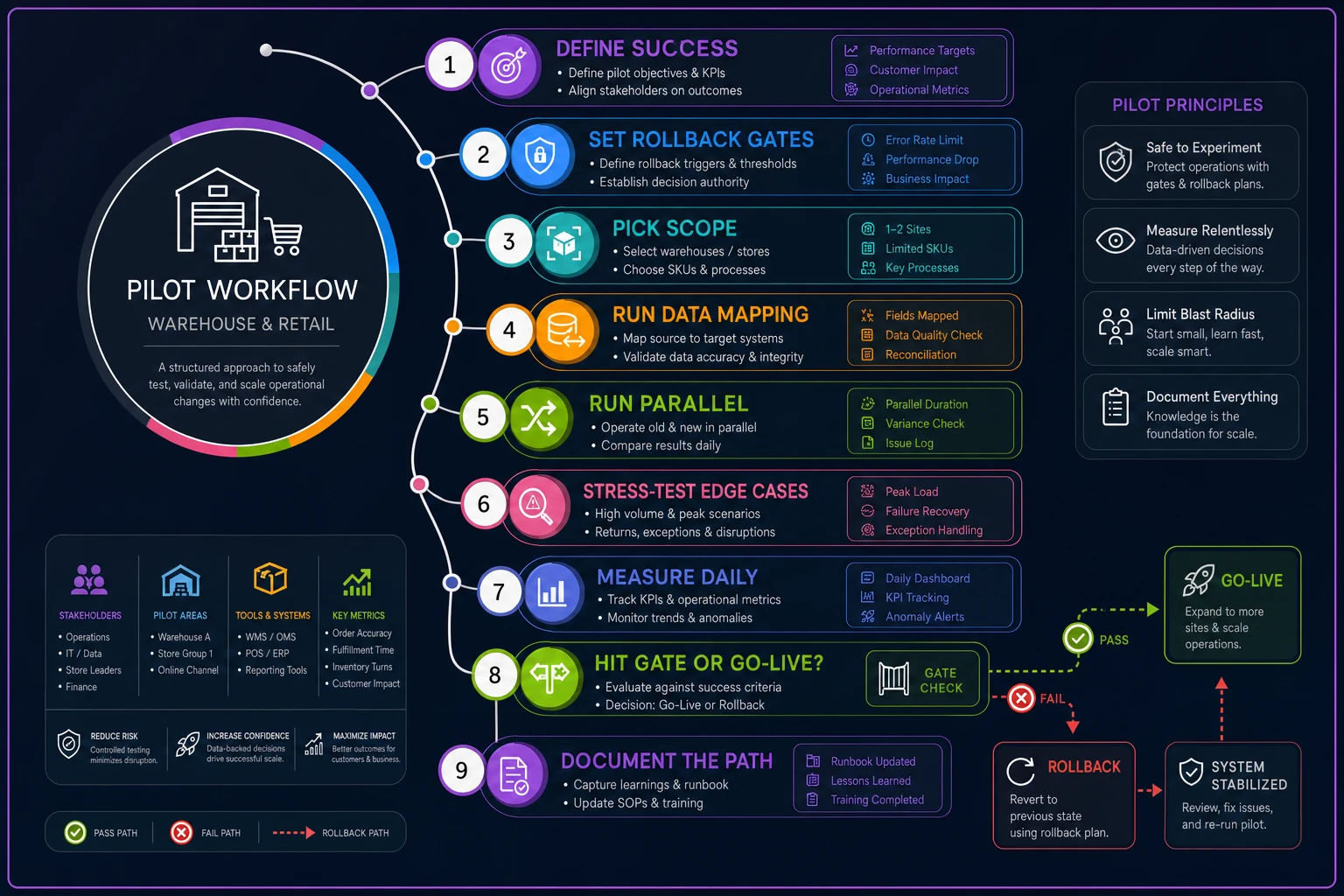
A simple flow diagram helps everyone see the gates and who decides.
A real scenario: a two-location home goods retailer
A small home goods business with two storefronts and a growing online channel was evaluating a new inventory platform to replace a spreadsheet-plus-POS setup that couldn't keep up with online orders. Roughly 1,800 active SKUs, around $220k in inventory value.
They almost cut over cold on a January weekend. Instead they ran a four-week pilot on their smaller store plus the online channel only.
The value-reconciliation check caught a problem immediately: the new system showed inventory value about 6% lower than the old one. The culprit was case-pack conversions — items bought by the case but sold individually had their UOM ratios reset to 1:1 on import, so on-hand quantities were off on close to 90 SKUs. Had they gone live cold, they'd have oversold dozens of items during the first busy weekend.
They also found the online order sync ran on a 15-minute delay, which meant during a flash promo the same lamp could sell twice before the count updated. That triggered a soft gate — they paused, and the vendor confirmed near-real-time sync was a paid tier, not included in the base plan.
They didn't reject the software. They renegotiated to include the faster sync tier, cleaned up their UOM data before full migration, and rolled out to the second location six weeks later with zero count surprises. The pilot cost them a few weeks of parallel-running effort. Cutting over blind would have cost them a chaotic weekend of oversells, refunds, and angry reviews during their busiest stretch.
When a full pilot makes sense — and when it doesn't
Run a full structured pilot when:
-
You have multiple locations or sales channels
-
Inventory value is significant relative to your cash position
-
You handle lot/serial tracking, perishables, or regulated goods
-
Your team is large enough that a bad rollout disrupts real revenue
A lighter-weight test is fine when:
-
You're a single location with a small, simple catalog
-
The new system is a minor upgrade, not a category change
-
You can genuinely afford a rough week without existential risk
Who should not skip the pilot entirely: anyone whose inventory data is currently messy. Migrating dirty data into a new system without a pilot guarantees you'll spend your first live month firefighting phantom stockouts and false reorders — and blaming software for what's really a data problem.
Where operational software helps — and where it doesn't
Modern AI-assisted inventory platforms can smooth parts of this. Some flag data mapping anomalies during import — catching when a UOM ratio looks wrong or when costs collapse into a single field — before those errors reach your live counts. Others monitor sync drift between channels and alert you when counts diverge past a threshold, which is exactly the kind of intermittent problem that's easy to miss until it causes an oversell.
But no software runs the pilot for you. The judgment calls — defining success, setting rollback gates, deciding what "good enough" means for your operation — those are yours. The tools reduce the manual grind of checking and monitoring; they don't replace the discipline of designing a test that can actually fail.
The point of a pilot isn't to prove the new system is great. It's to give the new system a fair chance to prove itself — and an honest chance to fail before failing costs you real money. Define your numbers, keep the old system alive, agree on when you'll walk away, and test the ugly edge cases instead of the pretty demo. Do that, and whether you end up switching or staying, you'll have made the call on evidence instead of hope.
Ready to optimize your inventory operations?
Join 2,000+ businesses using Listoly to reduce stockouts, save time, and improve order accuracy.