

Automation in a small inventory operation tends to start innocently enough. Someone sets up an auto-reorder rule. Then a low-stock Slack alert. Then a nightly sync between the POS and the warehouse system. Six months later there are forty moving parts, nobody fully remembers how half of them were configured, and when something breaks, the first sign is usually an angry customer or a $9,000 PO nobody approved.
That's the thing about automation at small scale: it works beautifully right up until it doesn't, and the failure is almost never loud. It's a safety-stock buffer someone bumped during a holiday rush and forgot to reset. It's an alert threshold set so sensitive that the team muted the whole channel. It's a sync job that silently stopped running on a Tuesday and nobody noticed until the following Monday's count was off by 300 units.
Governance is the boring word for the thing that prevents all of this. Not governance in the corporate-committee sense — nobody on a four-person team has time for that. Governance here means: a clear map of what's automated, who owns each piece, when a human has to step in, and how you reconstruct what happened when something goes sideways. This article walks through how to build that system so your automation stays reliable and auditable, without drowning a tiny team in process.
The real problem isn't the automation — it's the invisibility
When a rule fires correctly ten thousand times, you stop thinking about it. That's the trap. Automation removes work from your plate, which also removes it from your attention. And attention is the only thing catching the slow drift between what the system thinks is true and what's actually on your shelves.
Most automation failures in small operations aren't dramatic bugs. They're configuration decisions that made sense at the time and were never revisited. A seasonal lead-time override. A manually tweaked reorder point during a supplier delay. A "temporary" exclusion rule added during a promo. None of those are wrong when they're created — they become wrong three months later when the context that justified them is gone and nobody remembers they exist.
Start with an alert taxonomy, because most teams have the opposite
The single most common governance failure is alert noise. A team wires up notifications for everything — low stock, failed syncs, price changes, negative inventory, late POs — all dumped into one channel at one priority. Within a month, everyone has learned to ignore the channel. Which means the one alert that actually mattered got buried under forty that didn't.
Never run out of stock or overorder again.
Listoly streamlines inventory workflows to keep your business stocked and profitable.
- Real-time stock tracking
- Automated reorder alerts
- Supplier and purchase management
No credit card required
The fix is a taxonomy: every alert gets classified by severity and by required response. Not by what triggered it, but by what someone is supposed to do about it.
Here's a quick visual of the alert-to-action workflow to keep in mind.
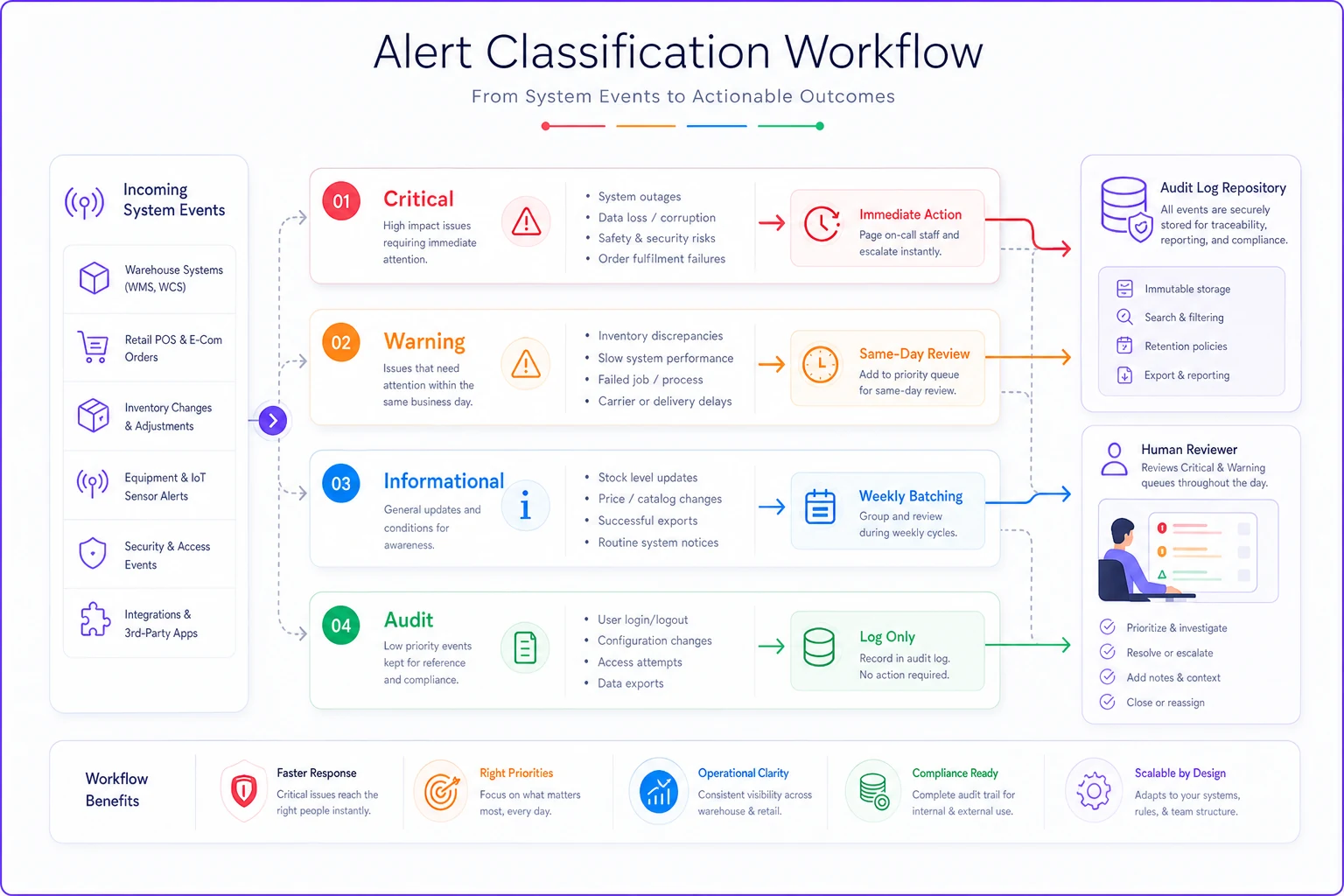
| Tier | What it means | Response expectation | Example |
|---|---|---|---|
| Critical | Money or customer impact imminent | Human acts within the hour | Negative on-hand on a top-20 SKU; auto-PO over $5k about to send |
| Warning | Will become a problem if ignored | Reviewed same day | Reorder point breached on a B-item; sync lag over 2 hours |
| Informational | Worth a record, not an interruption | Reviewed in weekly batch | Minor count variance under threshold; routine reorder fired as expected |
| Audit | Logged for the trail, never pinged | Only pulled when investigating | Every automated PO, every threshold change, every manual override |
The audit tier is the one people skip, and it's the one that saves you. You don't want to be notified every time a rule fires correctly — but you absolutely want a searchable record of it. When the month-end count is off and you're trying to figure out whether a bad auto-reorder caused it, that log is the difference between a ten-minute answer and a two-day forensic hunt.
Teams that get this right usually end up with fewer alerts after they build the taxonomy, not more. The exercise forces you to ask "what would I actually do about this?" and a surprising number of alerts turn out to have no real answer. Those become audit-tier logs, and the channel gets usable again.
Calibration: the part everyone sets once and never touches
Thresholds decay. A reorder point that was right in March is wrong by October because demand shifted, lead times moved, or the SKU's velocity changed. The automation keeps firing against stale numbers, confidently making worse and worse decisions.
Calibration is the scheduled practice of checking whether your automated thresholds still match reality. It doesn't need to be fancy. It needs to be regular and it needs an owner.
Treat calibration as maintenance — put it on the calendar and make one person responsible so it doesn't become "when we get around to it."
-
Monthly — Pull every SKU where the automation fired more or less than expected. If a reorder rule triggered three times in a month for a product that sells twelve units a month, something's miscalibrated.
-
Monthly — Review all active manual overrides. Anything older than its stated reason gets expired or re-justified. No permanent "temporary" overrides.
-
Quarterly — Recompute reorder points and safety stock against the last 90 days of actuals, not the numbers you set at setup.
-
Quarterly — Spot-check the 10 highest-value SKUs by hand. These are where a bad automated decision costs the most, so they earn human eyes.
-
After any major event — Supplier change, seasonal shift, new sales channel. Don't wait for the calendar if the ground moved.
The mistake here is treating calibration as optimization — something you do when you have spare time to make things better. It's not. It's maintenance. You're not improving the system, you're preventing it from silently degrading. If you've already built a metrics practice, this ties directly into it; the work of designing an inventory KPI system that turns metrics into decisions gives you the signals calibration depends on. Without those metrics, you're recalibrating blind.
Owner matrices: the question "who owns this rule?" should always have an answer
On a tiny team, everyone owns everything, which means nobody owns anything. For most work that's fine. For automation it's dangerous, because when a rule misbehaves, the default response is "I thought someone else was watching that."
An owner matrix is a flat list — honestly it can live in a spreadsheet — that maps every automated process to exactly one human. Not a team. One person. They don't have to be the one who fixes it; they're the one responsible for noticing it broke and getting it fixed.
-
The owner — one named person
-
The backup — who covers when the owner is out
-
What it does — one plain sentence, no jargon
-
What normal looks like — so you can recognize abnormal
-
Where it logs — so the audit trail is findable
-
Last reviewed — a date, updated at each calibration
That "what normal looks like" line is underrated. Most teams can tell you what a process does but not what healthy looks like. "This sync runs at 2am and moves about 400–600 line updates" is a baseline. When it moves 40, or 6,000, you now have a tripwire a human can actually recognize.
When someone leaves — which on a small team is a real event, not a rounding error — the owner matrix is what keeps their automation from becoming an orphaned black box. The number of small operations running a critical nightly job that was set up by someone who left two years ago, and that nobody dares touch, is genuinely alarming.
Automated gates vs. manual gates: deciding what a rule is allowed to do alone
Not every automated decision deserves the same level of trust. The core governance question is: at what point does a human have to approve before the automation acts? Draw that line in the wrong place and you either bottleneck everything with approvals or let the system make expensive mistakes unsupervised.
The useful framing is value and reversibility. A decision that's cheap and easy to undo can run fully automatic. A decision that's expensive or hard to reverse needs a gate.
-
Fully automated (no gate) Low-value reorders on fast-moving staples under a dollar threshold you're comfortable with. Routine transfers between locations. Status updates and logging. High-frequency, low-stakes, easy to correct.
-
Automated with a notification gate The system acts, but pings a human after. Mid-value POs. Safety-stock adjustments. Markdown triggers. The action happens so you're not bottlenecked, but someone sees it and can reverse it fast.
-
Manual gate required The system proposes, a human approves. Any PO above your pain threshold. New-supplier orders. Anything touching a top-revenue SKU. First-time rules you haven't learned to trust yet.
A practical pattern: new automations start behind a manual gate and graduate to automatic once they've proven themselves over a few dozen cycles. You watch the rule propose, you approve, and when you notice you're rubber-stamping every single one, that's your signal it's earned autonomy. This mirrors how good teams run any operational change — the same discipline behind running controlled tests in an experiments operating model for inventory ops applies to trusting a rule with real purchasing authority.
When fully-automatic is a bad idea
Resist automating decisions on anything that's low-volume and high-consequence. A SKU that moves twice a quarter but represents a big chunk of revenue should never auto-reorder. There isn't enough signal for the rule to be reliable, and the cost of a wrong call is too high. These belong permanently behind a manual gate, no matter how mature your automation gets.
Runbooks: because the alert is useless if nobody knows what to do with it
An alert tells you something's wrong. A runbook tells you what to do about it. Small teams are heavy on the first and almost entirely missing the second, which is why a critical alert at 4pm on a Friday turns into an hour of panicked Slack messages instead of a five-minute fix.
A runbook doesn't need to be a formal document. For most issues it's a short, repeatable sequence attached to a specific alert. The format that works:
-
Trigger — the exact alert or condition
-
First check — the single most likely cause, checked first
-
Diagnosis steps — numbered, in order, no guessing
-
Fix — what to actually do
-
Escalate if — the condition that means stop and get help
-
Log — what to record so the next person has history
Here's a concrete one for a common failure — the POS and warehouse counts drifting apart:
-
Trigger Variance alert, on-hand mismatch over 5% on any A-item.
-
First check Did the overnight sync complete? Look at the job log timestamp before anything else — a stalled sync explains most of these.
-
Diagnosis If sync ran clean, pull the transaction log for that SKU over the last 48 hours. Look for a sale with no matching deduction, or a receipt that didn't post.
-
Fix Correct the system count to a physical count, not the other way around. Note the correction.
-
Escalate if The variance spans more than five SKUs — that points to a systemic sync problem, not a one-off, and needs the system owner.
-
Log SKU, variance size, root cause, correction made, timestamp.
The value of writing these down isn't for the person who built the system. It's for the part-timer covering a shift, the new hire in week two, or you at 7pm when you're tired and not thinking clearly. A runbook turns a judgment call into a checklist, and checklists are what let a tiny team respond consistently even when the expert isn't around.
Escalation playbooks: deciding in advance who gets pulled in and when
Escalation is just a runbook's "escalate if" clause with names and timing attached. The goal is to remove the hesitation — the "should I bother someone about this?" delay that lets small problems grow while everyone waits to see if it resolves itself.
-
Level 1 — The owner (0–30 min) Owner works the runbook. Most issues die here.
-
Level 2 — Backup + system owner (30 min–2 hrs) Owner can't resolve, or it's spreading across SKUs. Pull in whoever understands the underlying system. Automation that's making bad decisions gets paused here, not left running while you debug.
-
Level 3 — Owner/manager + supplier (2+ hrs, or money at risk) Customer impact, financial exposure, or multiple systems involved. Someone with authority to spend money or call a vendor steps in.
That "pause the automation" step at Level 2 is the one small teams forget. When a rule is actively making wrong decisions, your first move is to stop it — kill the auto-PO, disable the sync, whatever — then diagnose. Leaving a broken automation running while you investigate is how a config error turns into forty bad orders.
One more thing worth building in: a standing rule that any automation paused during an incident cannot be re-enabled without a human confirming the fix and logging why it's safe to turn back on. Plenty of repeat incidents come from someone flipping automation back on because the immediate symptom cleared, without ever confirming the cause was actually fixed.
A real scenario: the quiet auto-PO drift
A regional home-goods retailer running three locations had auto-reorder set up across roughly 800 SKUs. It ran clean for most of a year. Then a supplier quietly extended lead times from about a week to closer to three, and nobody updated the lead-time field feeding the reorder logic.
The automation kept ordering as if stock would arrive in a week. It reordered before previous orders landed, stacking up duplicate POs. Over about six weeks they over-ordered one product category by somewhere around $14k–$16k in inventory they didn't need — cash tied up on shelves, in a business where cash was already tight.
The failure wasn't the automation. It was the absence of two things: no calibration step that would have caught the stale lead time, and no audit log anyone reviewed, so the duplicate POs went unnoticed until a warehouse manager wondered why the same item kept arriving.
After the cleanup they didn't rip out automation — they wrapped governance around it. A monthly calibration that flags any SKU reordering more often than its sell-through justifies. An owner on the reorder rules with a plain baseline of normal. A manual gate on any PO over $3k. And an audit-tier log, reviewed in the weekly ops meeting, listing every auto-PO that fired. The next supplier lead-time change got caught in the first monthly review instead of six weeks and five figures later.
Nothing in that fix was sophisticated. It was just making the invisible visible and giving each piece an owner.
Rolling this out without crushing a four-person team
The instinct when you read all this is to build everything at once, burn out in a week, and abandon it. Don't. Governance that's too heavy gets dropped, and dropped governance is worse than none because it creates false confidence.
Sequence it:
-
Week one — Inventory your automations. List every automated thing touching stock. Most teams are surprised how many there are and how many nobody fully remembers.
-
Week two — Assign owners. One name per automation. This alone catches a few orphaned processes.
-
Week three — Fix the alert noise. Apply the taxonomy. Demote everything that isn't actionable to audit-tier.
-
Week four — Set gates on the expensive stuff. Put manual approval on your highest-value automated decisions first. Leave the cheap, reversible ones alone.
-
Ongoing — Add calibration to an existing meeting. Don't create a new ritual; bolt it onto your weekly or monthly ops review.
The runbooks come later, written one at a time as incidents happen. The first time something breaks, document the fix. Over a few months you accumulate a real library without ever sitting down to "write all the runbooks," which is a task that never actually gets done.
If your team struggles to make new process stick — and most small teams do — the mechanics of getting there matter as much as the process itself. The approach in inventory SOP rollouts that stick applies directly: small, owned, embedded in existing routines beats comprehensive-but-ignored every time.
Where software earns its place here
A lot of this governance is a discipline problem, not a tooling problem. But a few parts are genuinely hard to do by hand, and that's where an operational platform with built-in automation controls pays off — specifically the audit trail and the gates.
Keeping a complete, searchable log of every automated action, every threshold change, and every override is tedious to maintain manually and tends to be the first thing that slips. A system that records this automatically means your audit tier exists whether or not anyone remembers to maintain it. Same with gates: configurable approval thresholds that route the right decisions to a human before execution are far more reliable than a person trying to remember to check a report. The goal isn't more automation — it's automation you can actually see into and trust, with a human in the loop exactly where the stakes justify it.
But the tooling only helps if the thinking underneath it is sound. A platform can log every auto-PO; it can't tell you that your lead-time field went stale. That's still calibration, still ownership, still a human deciding what normal looks like.
The point
Automation doesn't reduce your responsibility for inventory decisions — it changes the shape of that responsibility. Instead of making each call, you're accountable for the rules that make the calls, the thresholds those rules run on, and your ability to reconstruct what happened when something's off. Governance is how a small team holds that accountability without a dedicated ops department.
Start small. Map what you've automated, give each piece an owner, quiet the alert noise, gate the expensive decisions, and keep the log you'll be glad to have when the count doesn't match. The teams that do this don't automate less — they automate with their eyes open, which is the only kind of automation worth trusting with your inventory and your cash.
Ready to optimize your inventory operations?
Join 2,000+ businesses using Listoly to reduce stockouts, save time, and improve order accuracy.