


Most SMBs don't lose control of their inventory because they picked the wrong software. They lose control because nobody ever decided what "correct" data looks like, who's allowed to change it, or what happens when two people create the same product two different ways. The system just fills up with junk over months, and one day you're staring at a spreadsheet with three SKUs for the same blue hoodie and a purchase order about to go out for a product that technically doesn't exist in your ERP.
That's what master data governance is really about. Not some fancy data-quality program. Just a small set of agreed rules for how your product records are named, structured, owned, and cleaned. For a team of three to fifteen people, you don't need a governance committee. You need maybe two pages of standards and one person who owns the final say.
This is the playbook I'd hand a new inventory manager on day one.
Why product data rots — and why SMBs get hit harder
Bad master data doesn't announce itself. It accumulates. A typical pattern: you launch on Shopify with clean-ish SKUs, then add a wholesale channel, then a 3PL, then QuickBooks or an ERP. Each system has its own idea of what a product record needs. Somebody imports a supplier's catalog using the supplier's part numbers as SKUs. Someone else creates products manually during a busy week and skips the category field. Six months later nobody can trust a single report.
SMBs get hit harder than big companies not because they have more data — it's that they have less redundancy. A large retailer has a data team catching duplicates. In a small operation, the person creating the product is also the person receiving it, selling it, and reconciling it at month-end. When the data is wrong, there's no safety net. It flows straight into your POS vs warehouse mismatches, your forecasts, and your reorder math.
-
No canonical source. Product data lives in three systems and none of them is officially "the truth."
-
Naming by vibe. SKUs get created however whoever's typing feels that day.
BLU-HOOD-L,hoodiebluelg,1042-BL. -
Free-text everywhere. Color, size, and category are typed by hand instead of picked from a list, so "Navy," "navy," and "NVY" all coexist.
-
No owner. Anyone can create or edit a product, so nobody's accountable when it's wrong.
None of these are catastrophic on their own. Together they quietly break your ability to answer basic questions like "how many blue hoodies do we actually have."
Start with the minimal canonical attribute set
The single most useful thing you can do is decide, once, which attributes every product record must have — and refuse to accept records that don't have them. Keep this list short. The instinct is to demand 40 fields "for completeness," but in a small operation a 40-field standard means the standard gets ignored during the first busy week. Aim for the smallest set that supports your actual decisions.
Never run out of stock or overorder again.
Listoly streamlines inventory workflows to keep your business stocked and profitable.
- Real-time stock tracking
- Automated reorder alerts
- Supplier and purchase management
No credit card required
| Attribute | Required? | Controlled list? | Notes |
|---|---|---|---|
| SKU | Yes | Format rules | Never reused, never edited after creation |
| Product name | Yes | No | Human-readable, not the SKU |
| Category | Yes | Yes | Fixed list, max ~20 top-level |
| Brand / vendor | Yes | Yes | Tied to your supplier records |
| Unit of measure | Yes | Yes | Each, case, pack — define clearly |
| Cost | Yes | No | Landed or base, but pick one and be consistent |
| Barcode / UPC | If applicable | No | One canonical UPC per sellable unit |
| Status | Yes | Yes | Active, discontinued, pending |
| Size / variant attributes | If applicable | Yes | Pull from a fixed value list |
The important word in that table is controlled list. Any field that people type freely will eventually contain garbage. Anything that matters for grouping, filtering, or reporting — category, brand, size, unit of measure, status — should be a dropdown pulling from a defined set of values, not an open text box. That one decision prevents most of the duplicate-value mess before it starts.
Keep the required attribute list to only what you actually use for decisions so people can comply under pressure.
The other rule that matters: cost consistency. If half your records store base cost and half store landed cost, every margin report is quietly wrong. Decide which one lives in the master record and document it. Your inventory KPI system is only as good as the fields feeding it.
A SKU naming standard that survives contact with reality
SKU naming is where people either overthink it or don't think at all. Both fail. The goal is a SKU that's stable, unique, and just structured enough to be scannable — without trying to encode your entire business into 12 characters.
-
The SKU is an identifier, not a database. Don't try to cram cost, season, supplier, and location into it. Attributes belong in fields, not in the SKU string. When the supplier changes, you don't want to rename 200 SKUs.
-
Make it human-scannable but machine-stable. A light structure like
CATEGORY-STYLE-VARIANThelps humans, but keep the segments short and fixed-width. -
Decide zero-padding width now. If you use sequence numbers, set the width upfront —
0001not1— or sorting breaks later. -
Never reuse a SKU. When a product is discontinued, its SKU is retired forever. Reusing SKUs is how you get a return for a product that's now a completely different item.
-
Avoid characters that break systems. No spaces, no slashes, no ampersands. Stick to letters, numbers, and hyphens. Slashes especially wreck file exports and some APIs.
A workable pattern for an apparel SMB might look like HOOD-CLS-NVY-L: category (hoodie), style (classic), color (navy), size (large). Fixed segments, all uppercase, all pulled from your controlled value lists. Once you have the pattern, write down the allowed values for each segment. That document is your naming standard.
One caution: don't retrofit a beautiful new naming scheme onto thousands of existing SKUs unless you have a real reason. Renaming stable, working SKUs breaks barcodes, marketplace listings, and historical reports. Apply the new standard to new products and only remap old ones during a genuine migration.
Finding and cleaning duplicate SKUs
Duplicates are the most common and most damaging governance failure, because they split your inventory across two records. You think you have 6 of an item; you actually have 4 under one SKU and 3 under a near-duplicate, and your reorder logic fires at the wrong time.
Duplicates come in two flavors: exact duplicates (same SKU appearing twice, usually from a bad import) and logical duplicates (two different SKUs that are really the same product). Exact ones are easy to find. Logical ones are the painful ones — same UPC, or same name with different formatting.
Exact duplicate SKUs (shouldn't exist, but do after imports):
``sql
SELECT sku, COUNT() AS recordcount
FROM products
GROUP BY sku
HAVING COUNT() > 1
ORDER BY recordcount DESC;
``
Duplicate UPCs across different SKUs (the classic logical duplicate):
``sql
SELECT upc,
COUNT(DISTINCT sku) AS skucount,
STRINGAGG(sku, ', ') AS skus
FROM products
WHERE upc IS NOT NULL AND upc <> ''
GROUP BY upc
HAVING COUNT(DISTINCT sku) > 1
ORDER BY sku_count DESC;
``
Near-duplicate names (catches formatting variants like "Navy Hoodie" vs "navy hoodie"):
``sql
SELECT LOWER(TRIM(REPLACE(productname, ' ', ' '))) AS normalizedname,
COUNT() AS variants,
STRINGAGG(sku, ', ') AS skus
FROM products
GROUP BY LOWER(TRIM(REPLACE(productname, ' ', ' ')))
HAVING COUNT() > 1
ORDER BY variants DESC;
``
Records missing required master fields (your data-quality scan):
``sql
SELECT sku, productname
FROM products
WHERE category IS NULL
OR brand IS NULL
OR unitof_measure IS NULL
OR status IS NULL;
``
When you find logical duplicates, resist the urge to just delete one. You have to merge: pick the surviving SKU, move all inventory, order history, and open POs onto it, then retire the loser (set status to discontinued rather than deleting, so history stays intact). Deleting a duplicate that has transaction history behind it creates orphaned records that are worse than the original duplicate.
An owner matrix so accountability doesn't evaporate
Standards without owners are wishes. Product data rots in small teams because "everyone" can touch it, which means no one is responsible for it. You fix this with a simple owner matrix — who can do what to a product record at each stage of its life.
For a small team, this is enough:
| Action | Owner | Approver | Notes |
|---|---|---|---|
| Create new product | Buyer / merchandiser | Inventory manager | Must meet minimum attribute set |
| Assign SKU | Inventory manager | — | Enforces naming standard |
| Edit cost | Buyer | Inventory manager | Logged, not silent |
| Change category/brand | Inventory manager | — | Controlled lists only |
| Discontinue product | Inventory manager | Owner/GM | Sets status, never deletes |
| Merge duplicates | Inventory manager | Owner/GM | Follows merge procedure |
| Bulk import | Whoever imports | Inventory manager | Validated before load |
The point isn't bureaucracy. It's that one person — usually the inventory manager — is the gatekeeper for SKU creation and structural changes. Everyone else can propose; one role approves. In a five-person shop this might all be one person, and that's fine. What matters is that the role is written down, so when you hire, the responsibility transfers instead of disappearing.
The single highest-leverage rule: nobody creates a product record without going through the person who owns SKU assignment. The moment side-door product creation is allowed — a marketplace auto-creating listings, a warehouse worker adding an item on the fly — your standard is dead. Close those doors or route them through a validation step.
The migration checklist
At some point you'll consolidate systems or do a proper cleanup, and that's a migration. This is exactly when governance either gets baked in or lost forever. Migrating dirty data into a clean new system just gives you dirty data in a nicer interface. Clean first, then move.
-
[ ] Freeze new product creation during the migration window, or route it through a single person.
-
[ ] Export a full snapshot of the current master and back it up untouched.
-
[ ] Run the duplicate and missing-field queries above; produce a cleanup worklist.
-
[ ] Resolve duplicates by merging, not deleting — document each merge (surviving SKU, retired SKU).
-
[ ] Fill required attributes for every active record; discontinue anything truly dead instead of migrating it.
-
[ ] Normalize controlled-list values (one spelling of "Navy," one unit-of-measure vocabulary).
-
[ ] Apply the naming standard to new SKUs and remap only where necessary; keep a crosswalk of old→new SKUs.
-
[ ] Validate a sample — pull 30–50 records and check them by hand against the standard.
-
[ ] Load into the new system with validation rules turned on from day one.
-
[ ] Reconcile counts — total active SKUs and on-hand units before and after should tie out.
-
[ ] Keep the old snapshot for at least a couple of cycles in case something's off.
The step people skip is the crosswalk — a simple table mapping every old SKU to its new one. Without it, a customer return or a historical report referencing an old SKU has nowhere to land. Five minutes of discipline that saves days of confusion later.
Clean master data also quietly improves everything downstream, including your low-data forecasting, which depends on being able to trust that one SKU equals one product.
A simple migration workflow:
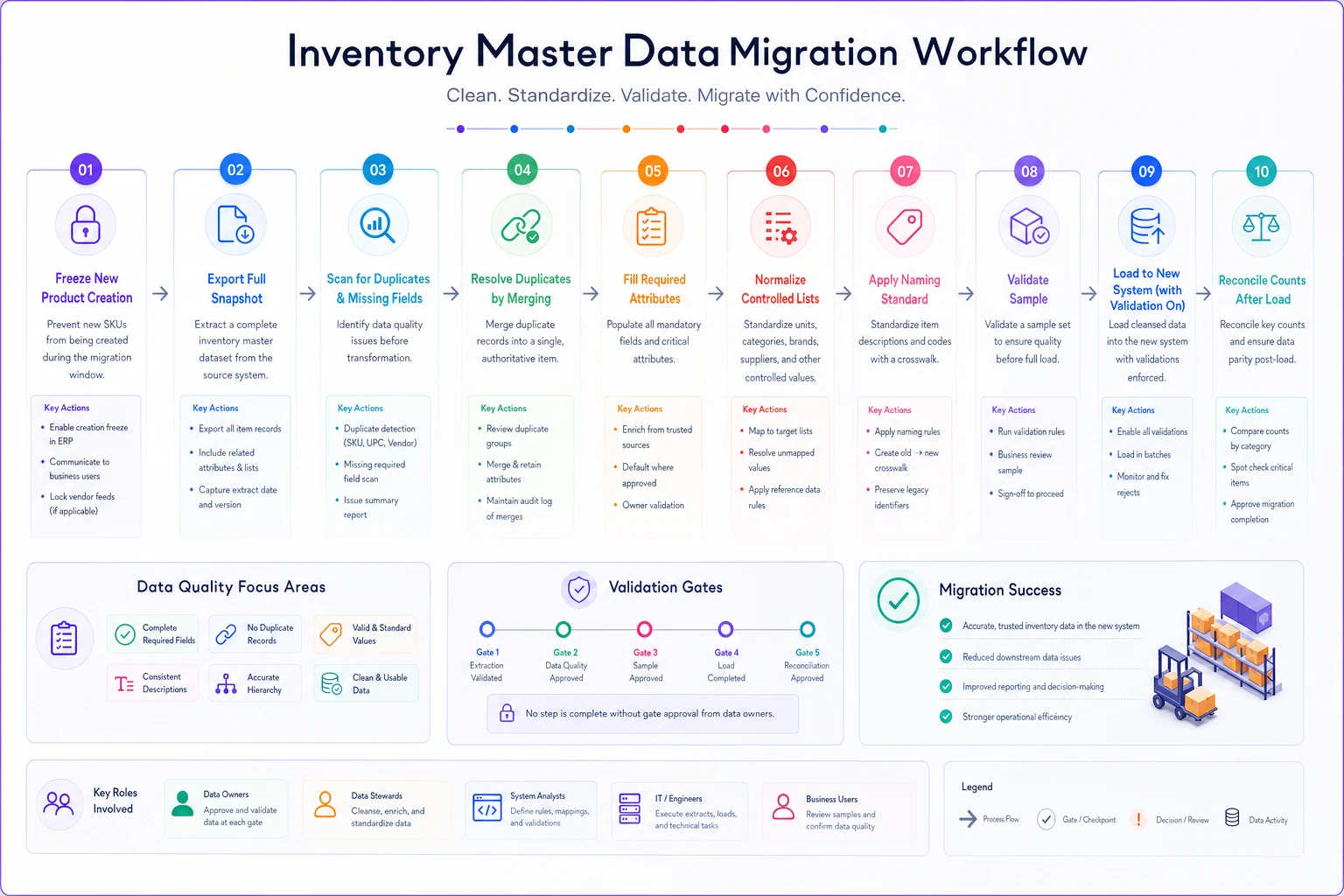
Keep the old snapshot for rollback and maintain the crosswalk so historical references still resolve.
A short real scenario
A small home-goods distributor — around 2,800 active SKUs, six people — came into a system consolidation assuming they had a reasonably clean catalog. Running the duplicate-UPC query turned up roughly 140 SKUs that were logical duplicates: the same product entered once from a manual add and once from a supplier import using the supplier's part number as the SKU.
The practical damage was reorder noise. Because inventory was split across duplicate records, reorder alerts were firing early on some items and late on others, and they'd placed a handful of unnecessary rush orders — a couple thousand dollars a quarter in avoidable freight and overstock. After merging duplicates onto surviving SKUs, retiring the losers, and enforcing the "inventory manager approves all new SKUs" rule, count discrepancies during weekly reconciliation dropped noticeably and the rush-order pattern basically stopped.
Nothing about that fix was technically hard. The hard part was deciding — once — what a correct record looks like and who owns it.
Where tooling actually helps
You can run all of this with SQL, spreadsheets, and discipline. Discipline is the part that fails first.
The value of an operational platform here isn't magic — it's enforcement. Required fields that block a save when empty, dropdowns instead of free text, a single record that can't be created behind the inventory manager's back, and duplicate detection that flags a matching UPC before a second record exists instead of six months later.
That's the honest role of software in master data governance. It doesn't invent your standard for you — you still have to decide your canonical attributes and naming rules. But it makes the rules automatic instead of dependent on everyone remembering them during a busy week, which is exactly when they'd otherwise get skipped. AI-powered operational platforms can also surface anomalies across your catalog on a rolling basis — flagging records that drift out of compliance without waiting for a quarterly audit — but even that only works if the underlying standard is solid.
The takeaway
Master data governance in a small business isn't a project you finish. It's a couple of decisions you make and then defend: a short list of required attributes, a naming standard for new SKUs, controlled lists instead of free text, one owner for creation and structural changes, and a clean merge procedure for the duplicates that will inevitably show up. Write those down. Enforce them at the point of creation. Run your duplicate queries on a regular cadence rather than waiting for a migration to force it.
Do that, and the reports, forecasts, and reorder logic sitting on top of your product data finally have something solid to stand on. Skip it, and you'll keep paying for it in wrong counts, phantom stockouts, and the slow erosion of trust in your own numbers.
Ready to optimize your inventory operations?
Join 2,000+ businesses using Listoly to reduce stockouts, save time, and improve order accuracy.